@File
2020-04-13T08:55:59.000000Z
字数 1184
阅读 220
Git安装
idea
下载安装
- 在 github 中创建一个账号:https://github.com/join?source=header-home
- 下载并安装 git:https://git-scm.com/downloads (尽量不要装 C 盘)
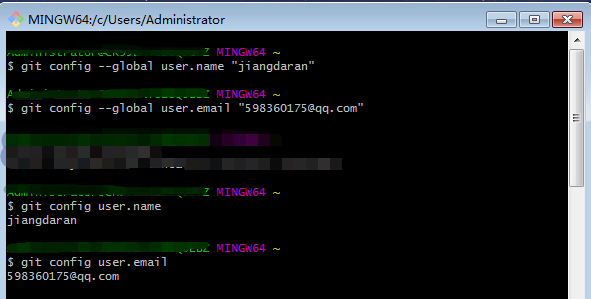
- 安装成功后打开 Git Bash,输入下列命令,设置 git 全局用户名和邮箱
$ git config --global user.name "jiangdaran"$ git config --global user.email "598360175@qq.com"
- 使用下列命令查看是否设置成功
$ git config user.name$ git config user.email
idea配置git
1. 在 IDEA 中配置 Git 插件
在 File-->Plugins-->勾选 Git Integration 和GitHub进行下载
](http://static.zybuluo.com/File/7em4g218j2uyjomijyfp9dpx/image_1dgjbnsq04881eq34v71qm6k7rm.png)
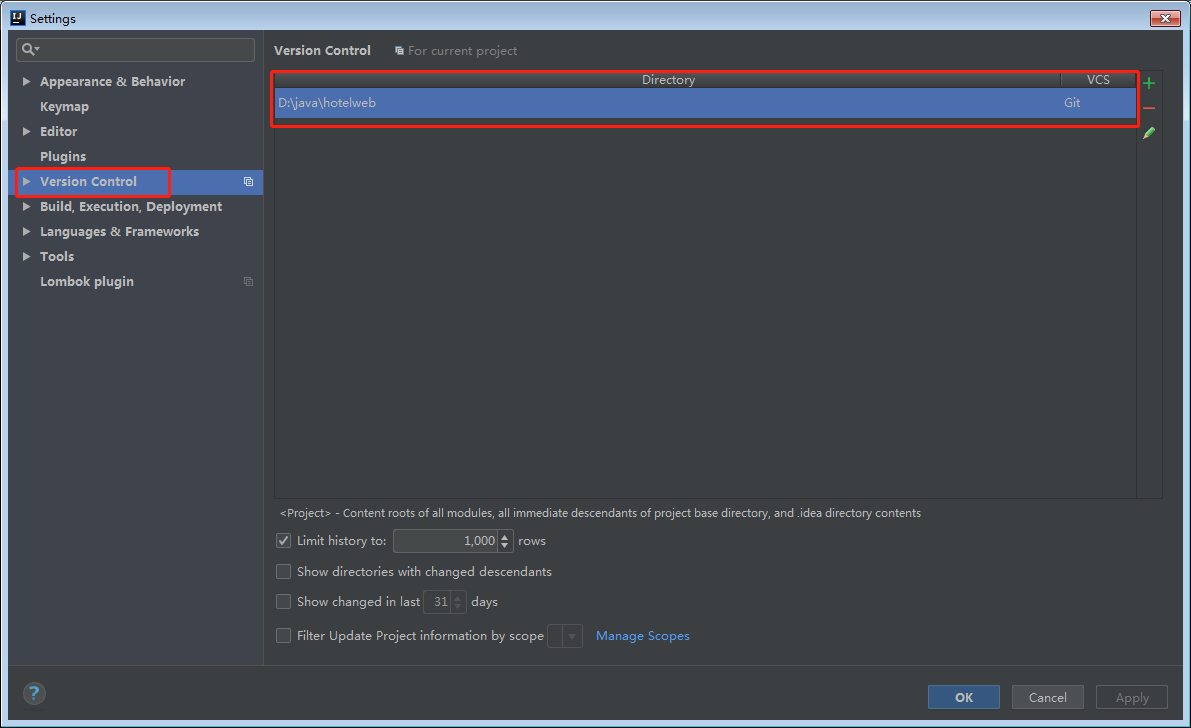
2. 在 IDEA 中设置 Git
在 File-->Setting->Version Control-->Git-->Path to Git executable 选择你的 git 安装后的 git.exe 文件,然后点击 Test,测试是否设置成功
](http://static.zybuluo.com/File/mk9ij8ngnxda02efugnal8k7/image_1dgjbosii15sj162v17441i8gdit13.png)
3. 在 IDEA 中设置 GitHub
File-->Setting->Version Control-->GibHub
](http://static.zybuluo.com/File/qa5l0i61ce840je1f7eq14eb/image_1dgjbpcdnb31l0h30tn6eduo1g.png)
4. 创建本地仓库
VCS(version control system)-->Import into Version Control-->Create Git Repository...
](http://static.zybuluo.com/File/1wgn75eehb3kxl8m52mhpc1q/image_1dgjbsbi0u6q15c7iq1h8hq012a.png)
5. 上传项目到 GitHub
VCS-->Import into Version Control-->Share Project on GitHub,在弹框中输入仓库名和描述,点击Share,即可是上传,中间会弹窗输入GitHub的用户名和密码(已输入过用户名和密码并记住的不会再次弹框输入),上传成功后IDEA右下角会给出提示
](http://static.zybuluo.com/File/5l2y10clh6yz1gvm74pv4nx0/image_1dgjbsro7m3aqfrvkp19m2n.png)
6. 提交修改文件到 GitHub
- 新增文件(红色),右键-->Git-->add,将新增的文件加入本地仓库,此时文件变绿色
- 修改文件(蓝色)
- 在项目右键-->Git-->Commit Directory,查看有变动的文件并输入 Commit Message,点击 Commit and Push...
- 提交后会进行语法检查,若存在错误或警告会给出确认提示,点击 Commit,弹出 Push框,点击 Push,上传 GitHub 成功
](http://static.zybuluo.com/File/rp8izc1xzcv9g82h6190rj9g/image_1dgjbuuuc1af71ag69u01gq6nbg34.png)
](http://static.zybuluo.com/File/o71bnchdw3flm9l3whu7wsfj/image_1dgjbvlup1i6t7p017bh158ushk3h.png)
](http://static.zybuluo.com/File/u735ttw6w193n940qonigdp8/image_1dgjc05p61hma1ufa1mt98uc1b443u.png)
](http://static.zybuluo.com/File/c3txfiqwmwr6kf4vz8rziody/image_1dgjc0mml1de1qe73s316b3h9s4b.png)
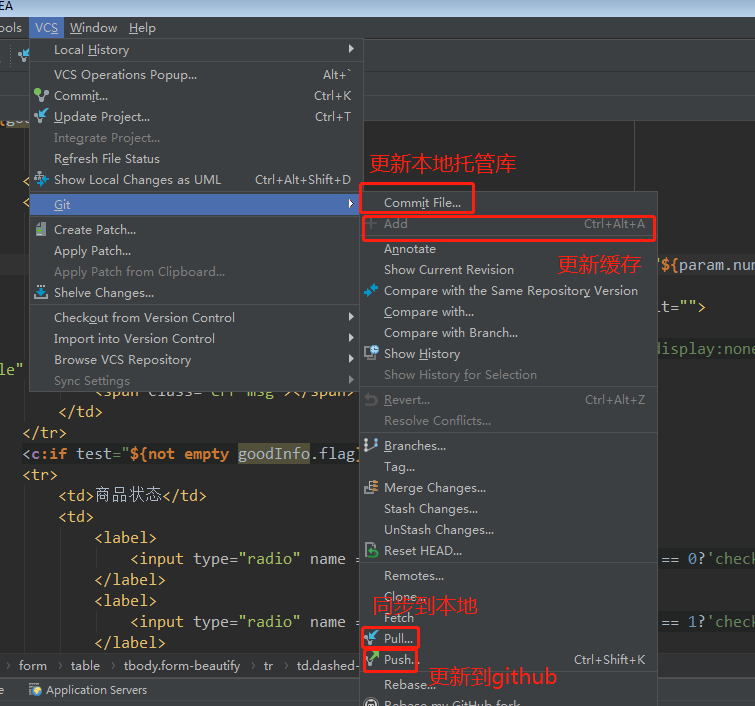
7. 更新或同步操作的位置
8. 修改或取消git连接