@wddzzz
2018-04-26T13:43:28.000000Z
字数 3103
阅读 1308
服务器配置流程
服务器 SVN linux
环境
一台购置好的服务器,Cent OS 6.5 64位操作系统。
0.准备
rpm -Uvh https://dl.fedoraproject.org/pub/epel/epel-release-latest-6.noarch.rpm
rpm -Uvh https://mirror.webtatic.com/yum/el6/latest.rpm
1.安装
yum install httpd //安装apacheyum install mysql-server //安装mysqlyum install php56w php56w-mysql //安装phpyum install phpmyadmin //安装phpmyadminyum install subversion //安装svnyum install mod_dav_svn //同上
或者一句话直接全部安装
yum install httpd mysql-server php56w php56w-mysql phpmyadmin subversion mod_dav_svn
2.启动服务
service httpd startservice mysqld start
3.Config MySQL
mysql_secure_installation
配置过程参考:http://www.jb51.net/article/47727.htm
[root@server1 ~]# mysql_secure_installationNOTE: RUNNING ALL PARTS OF THIS SCRIPT IS RECOMMENDED FOR ALL MySQLSERVERS IN PRODUCTION USE! PLEASE READ EACH STEP CAREFULLY!In order to log into MySQL to secure it, we'll need the currentpassword for the root user. If you've just installed MySQL, andyou haven't set the root password yet, the password will be blank,so you should just press enter here.Enter current password for root (enter for none):<–初次运行直接回车OK, successfully used password, moving on…Setting the root password ensures that nobody can log into the MySQLroot user without the proper authorisation.Set root password? [Y/n] <– 是否设置root用户密码,输入y并回车或直接回车New password: <– 设置root用户的密码Re-enter new password: <– 再输入一次你设置的密码Password updated successfully!Reloading privilege tables..… Success!By default, a MySQL installation has an anonymous user, allowing anyoneto log into MySQL without having to have a user account created forthem. This is intended only for testing, and to make the installationgo a bit smoother. You should remove them before moving into aproduction environment.Remove anonymous users? [Y/n] <– 是否删除匿名用户,生产环境建议删除,所以直接回车… Success!Normally, root should only be allowed to connect from 'localhost'. Thisensures that someone cannot guess at the root password from the network.Disallow root login remotely? [Y/n] <–是否禁止root远程登录,根据自己的需求选择Y/n并回车,建议禁止… Success!By default, MySQL comes with a database named 'test' that anyone canaccess. This is also intended only for testing, and should be removedbefore moving into a production environment.Remove test database and access to it? [Y/n] <– 是否删除test数据库,直接回车- Dropping test database…… Success!- Removing privileges on test database…… Success!Reloading the privilege tables will ensure that all changes made so farwill take effect immediately.Reload privilege tables now? [Y/n] <– 是否重新加载权限表,直接回车… Success!Cleaning up…All done! If you've completed all of the above steps, your MySQLinstallation should now be secure.Thanks for using MySQL![root@server1 ~]#
4.Config Startup
chkconfig httpd onchkconfig mysqld on
5.配置phpmyadmin配置文件
phpMyAdmin的Apache配置文件路径:/etc/httpd/conf.d/phpMyAdmin.conf
找到以下代码段,修改为允许任意ip访问:Allow from All:
<Directory /usr/share/phpMyAdmin/>AddDefaultCharset UTF-8<IfModule mod_authz_core.c># Apache 2.4<RequireAny>Require ip 127.0.0.1Require ip ::1</RequireAny></IfModule><IfModule !mod_authz_core.c># Apache 2.2Order Deny,AllowDeny from AllAllow from 127.0.0.1Allow from ::1Allow from All //在这里添加这一行</IfModule></Directory>
6.配置SVN
阿里云服务器需要手动开启3690端口以支持SVN的服务:
1.登录到阿里云后台
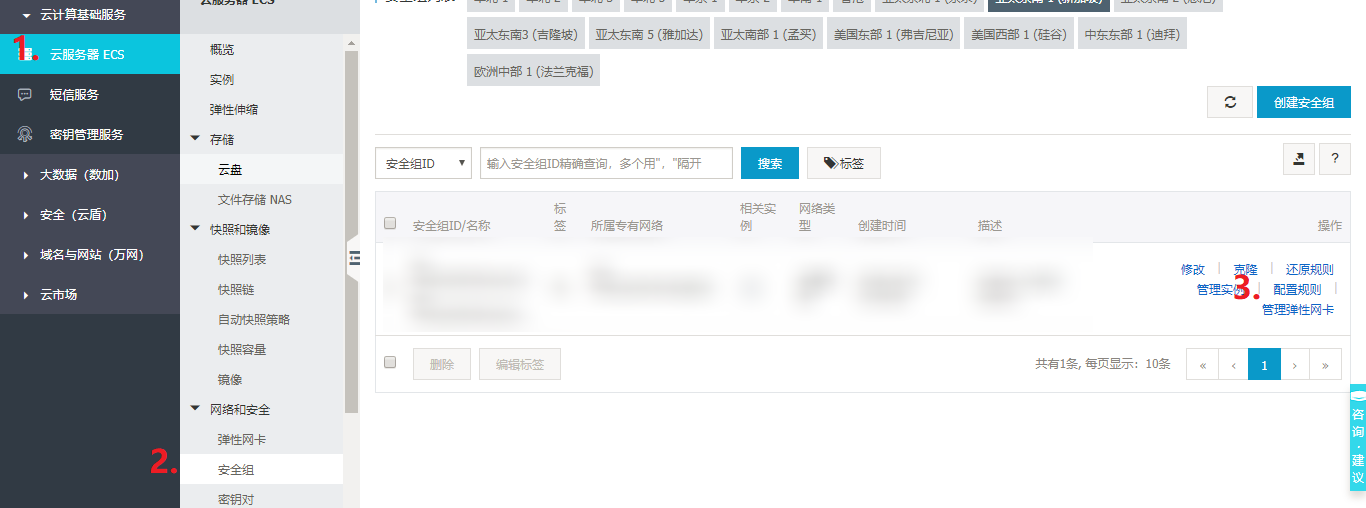
云服务ECS-安全组-配置规则
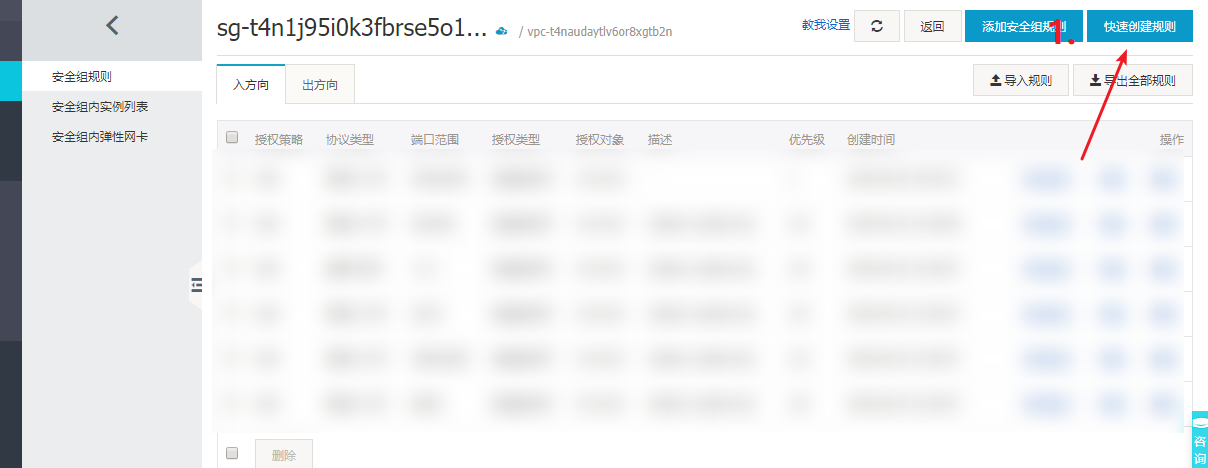
右上角 快速创建规则
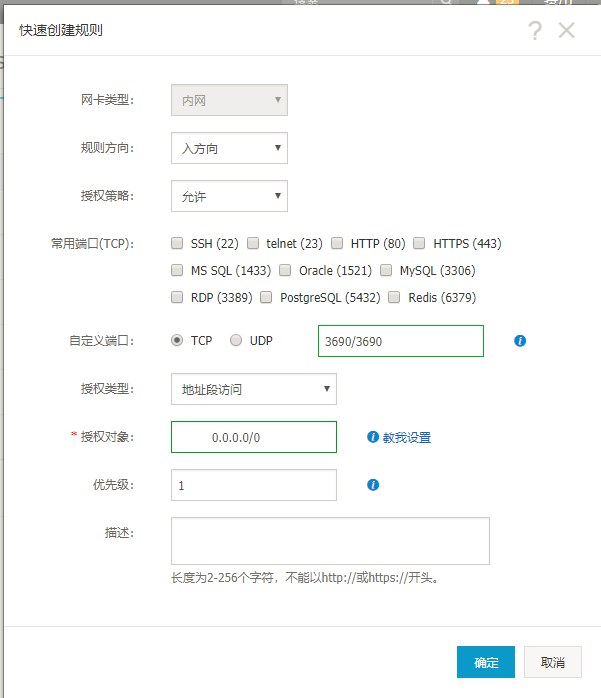
按照图中填写,确定即可
2.重启服务器
reboot
3.创建测试svn
svnadmin create /home/svn/testsvnserve -d -r /home/svn //启动svn服务
4.修改svn配置文件
打开/home/svn/test/conf/svnserve.conf,找到以下代码行,取消注释
auth-access = writepassword-db = passwdauthz-db = authz
以后再创建svn的时候,复制这个配置文件到新的svn里,因为这三行默认都是注释掉的。
7.创建站点
创建站点详情见另一更详细的文档。
