@Awille
2022-07-11T09:40:11.000000Z
字数 5257
阅读 512
Exoplayer Rener与DataSource数据流交互
Android Exoplayer
前言
文章开始前,先说结论,DataSource的数据获取与Render之间是两个独立的流程,他俩在不同的线程但当中,他俩之间的数据交互通过我们传入的LoadControl中的Allocator进行 还有 loadControl当中的shouldContiueLoading接口相互制约。
1、Exoplayer Prepare过程
1.1、prepare整体流程
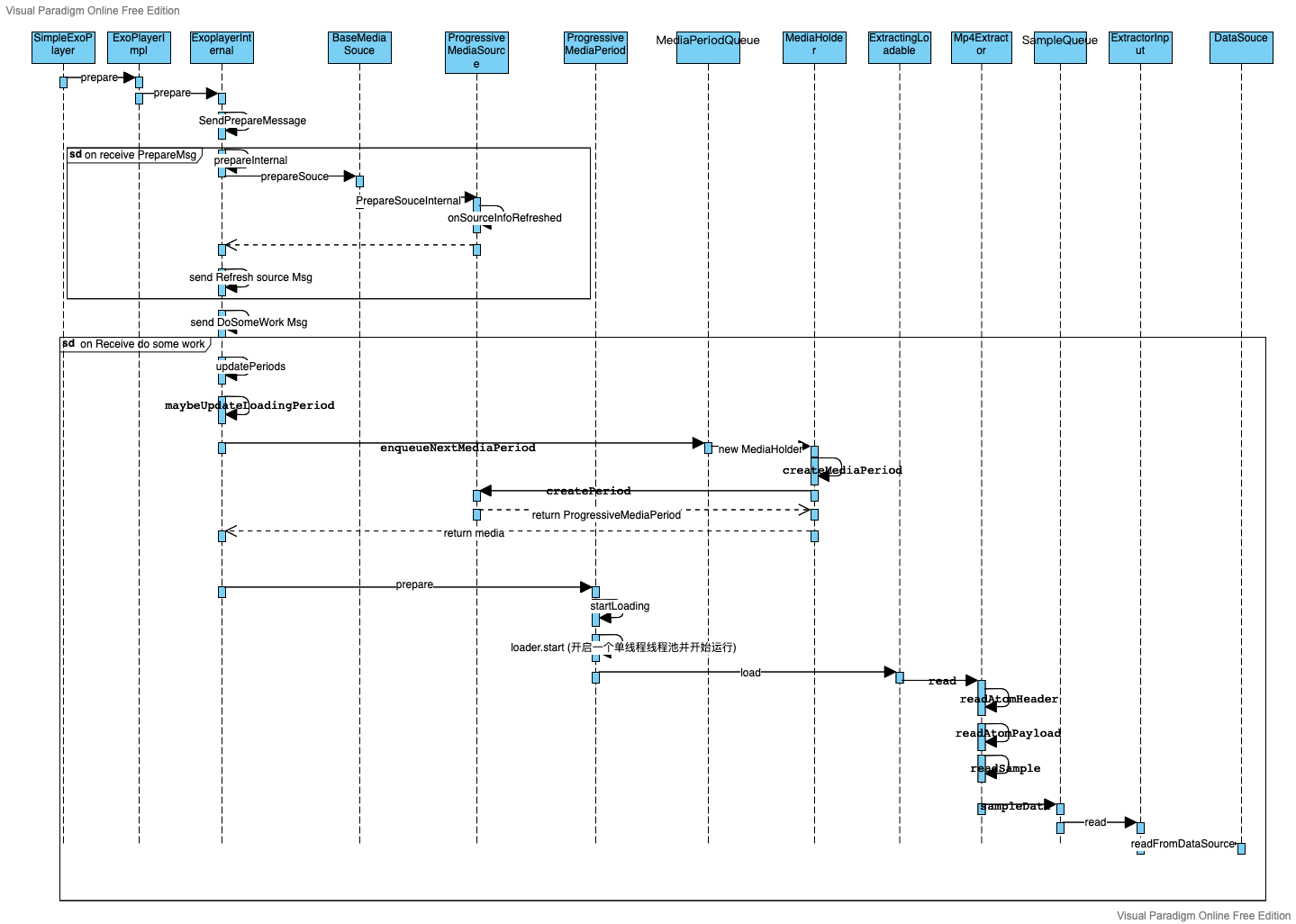
整个prepare的过程也是Exoplayer播放资源加载的整体流程,其核心逻辑都在ExoPlayerInternal当中,ExoplayerInternal自己内部维护了一个handlerThread, 该类基本上所有的方法调用都会通过发送消息的方式,最终在其维护的handlerThread当中执行。有关prepare的核心部分在收到 MSG_DO_SOME_WORK 的消息后执行的doSomeWork()函数当中, 在整个流程图中可以看到最终在ExtractingLoadable的load过程中开始了整个数据源的获取,其中Mp4Extractor是最MP4数据格式的解析器,负责从MP4数据流中获取并解析数据。 而且这整个load过程是在ProgressiveMediaPeriod当中的Loader维护的单线程线程池中。
1.2、结论
整个prepare中的数据源获取流程在ProgressiveMediaPeriod内部Loader对象维护的单线程线程池当中,DataSource包装成ExtractorInput, Mp4Extractor从extractorInput中获取数据,Mp4Extractor获取数据的产物为各个针对不同track的TrackOutput, TrackOutput其中一个实现为SampleQueue,最终获取的数据都是存在SampleQueue当中,这也是render获取数据的地方,具体联系我们后面探究。
2、Renderer数据获取流程
2.1、MediaCodeC简介
我们的视频、音频数据的解码其实使用Android提供的MediaCodeC来完成,Exoplayer里面的各个Renderer实际是MediaCodeC能力的封装。
MediaCodeC的数据获取流程为:
- createByCodeName/createEncoderByType/createDecoderByType: (静态工厂构造MediaCodec对象)--Uninitialized状态
- configure:(配置) -- configure状态
- start        (启动)--进入Running状态
- while(1) {
    try{
       - dequeueInputBuffer    (从编解码器获取输入缓冲区buffer)
       - queueInputBuffer      (buffer被生成方client填满之后提交给编解码器)
       - dequeueOutputBuffer   (从编解码器获取输出缓冲区buffer)
       - releaseOutputBuffer   (消费方client消费之后释放给编解器)
    } catch(Error e){
       - error                   (出现异常 进入error状态)
    }

}
- stop                          (编解码完成后,释放codec)
- release
2.2、ExoPlayer当中renderer的数据获取
Exoplayer中renderer的核心渲染逻辑也在doSomeWork()当中,当在doSomeWor检测到有可以Play的Period时,会遍历所有enableRenderer的render()函数去进行数据加载。
我们以MediaCodecRenderer为例,在其render()函数当中核心逻辑为:
if (codec != null) {
  long drainStartTimeMs = SystemClock.elapsedRealtime();
  TraceUtil.beginSection("drainAndFeed");
  while (drainOutputBuffer(positionUs, elapsedRealtimeUs)) {}
  while (feedInputBuffer() && shouldContinueFeeding(drainStartTimeMs)) {}
  TraceUtil.endSection();
}
- drainOutputBuffer从从编解码器获取输出缓冲区buffer,并消费缓存区数据。
- feedInputBuffer()从编解码器获取输入缓冲区buffer,并填充缓存区。
我们重点关注下输入过程:
在feedInputBuffer()的逻辑当中,大体流程为首先获取输入缓存区,然后拿要解码的数据填充输入缓冲区。 这里拿数据填充输入缓冲区的具体操作是我们想要了解renderer和dataSource获取的数据关系的关键。在feedInputBuffer()当中,有个核心的代码:
result = readSource(formatHolder, buffer, false);
再看readSource:
  protected final int readSource(FormatHolder formatHolder, DecoderInputBuffer buffer,
      boolean formatRequired) {
    int result = stream.readData(formatHolder, buffer, formatRequired);
    ...
    return result;
  }
其中关键就是我们怎么往DecoderInputBuffer中填充数据,在这里我们可以看到是从stream变量中读取数据区的,这里的stream为SampleStream对象,对应的实现为ProgressiveMediaPeriod.SampleStreamImpl,可以看到readData方法:
@Override
public int readData(FormatHolder formatHolder, DecoderInputBuffer buffer,
    boolean formatRequired) {
    return ProgressiveMediaPeriod.this.readData(track, formatHolder, buffer, formatRequired);
}
最终实现在ProgressiveMediaPeriod当中,
int readData(int track, FormatHolder formatHolder, DecoderInputBuffer buffer,
    boolean formatRequired) {
    ...
    int result =
        sampleQueues[track].read(
            formatHolder, buffer, formatRequired, loadingFinished, lastSeekPositionUs);
    ...
    return result;
  }
可以看到最终是从不同track的sampleQueue中获取的数据的,sampleQueue在上面讲数据源perpare过程已经提到过,是trackOut的实现,是Mp4Extractor的产物。
2.3、总结
renderer的数据获取实际上是在ExoplayerInternal内部的handlerThread线程中进行,他与数据的加载与解析过程实际是在两个线程当中。
3、renderer解码数据与Loader中dataSource的数据的相互控制
3.1、线程模型解析:
经过上面的讲解我们可以看看,exoplayer的线程模型:
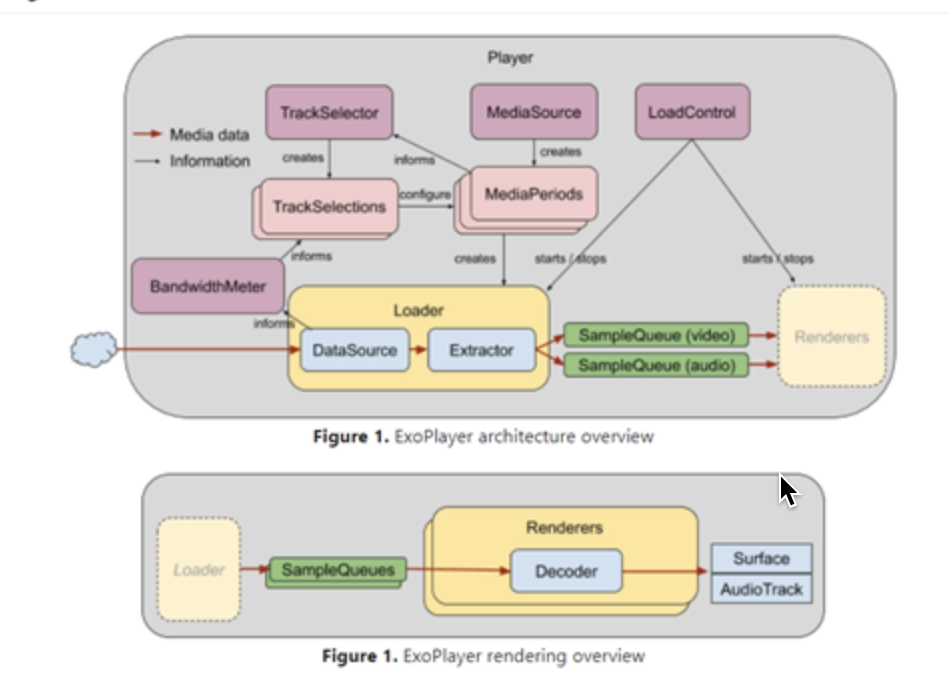
可以看到Loader中的线程专门负责Extractor解析与dataSource获取,Extractor产物为trackOutput,存放与SampleQueue当中,render渲染并更新播放数据(如播放进度等),而在Loader过程中,有以下核心逻辑:
@Override
public void load() throws IOException, InterruptedException {
      int result = Extractor.RESULT_CONTINUE;
      while (result == Extractor.RESULT_CONTINUE && !loadCanceled) {
        ExtractorInput input = null;
        try {
          input = new DefaultExtractorInput(extractorDataSource, position, length);
          Extractor extractor = extractorHolder.selectExtractor(input, extractorOutput, uri);
          while (result == Extractor.RESULT_CONTINUE && !loadCanceled) {
            loadCondition.block();
            result = extractor.read(input, positionHolder);
            if (input.getPosition() > position + continueLoadingCheckIntervalBytes) {
              position = input.getPosition();
              loadCondition.close();
              handler.post(onContinueLoadingRequestedRunnable);
            }
          }
        } finally {
          ...
          Util.closeQuietly(dataSource);
        }
      }
    }
在第二个while循环当中,每当input.getPosition() > position + continueLoadingCheckIntervalBytes(值为1M),会调用loadCondition.close()停止调当前流程,并通过handler往消息队列发送onContinueLoadingRequestedRunnable任务
loadCondition.close():
  public synchronized boolean close() {
    boolean wasOpen = isOpen;
    isOpen = false;
    return wasOpen;
  }
close后下次循环进行检查loadCondition.block(),阻塞该线程。
  public synchronized void block() throws InterruptedException {
    while (!isOpen) {
      wait();
    }
  }
可以继续看下onContinueLoadingRequestedRunnable:
调用了ExoPlayerImplInternal#onContinueLoadingRequested:
  @Override
  public void onContinueLoadingRequested(MediaPeriod source) {
    handler.obtainMessage(MSG_SOURCE_CONTINUE_LOADING_REQUESTED, source).sendToTarget();
  }
最终消息执行会调用loadControl.shouldContinueLoading
  private void maybeContinueLoading() {
    ...
    //已缓存微妙时长视频
    long bufferedDurationUs =
        getTotalBufferedDurationUs(/* bufferedPositionInLoadingPeriodUs= */ nextLoadPositionUs);
    boolean continueLoading =
        loadControl.shouldContinueLoading(
            bufferedDurationUs, mediaClock.getPlaybackParameters().speed);
    setIsLoading(continueLoading);
    if (continueLoading) {
      loadingPeriodHolder.continueLoading(rendererPositionUs);
    }
  }
在loadingPeriodHolder.continueLoading(rendererPositionUs)最终回调用com.ProgressiveMediaPeriod#continueLoading ->loadCondition.open()唤醒加载任务。
3.2、结论
综上分析,我们播放过程中的MediaCodeC解码与Mp4Extractor当中的数据解析是在两个独立的线程中,对Mp4Extractor当中的数据解析可通过LoadControl控制。 在LoadControl当中,可以获取到当前已解析的数据大小,以及当前播放的时长。
