@fuxinghua
2018-11-21T06:51:01.000000Z
字数 3815
阅读 521
redux在react native中的高级应用篇
redux ReactNative
上一篇文章,介绍了redux在react native中的同步应用,也就是发出action, reducer函数重新计算state,然后更新视图View。
上面只是介绍了同步操作,在项目中异步操作该怎么办呢?所谓的异步操作,就是action发出后不是立即执行reducer,而是过一段时间执行reducer,然后更新视图。
如何解决这样的问题呢?我们需要用到中间件(middleware)
备注:图片来之阮一峰博客
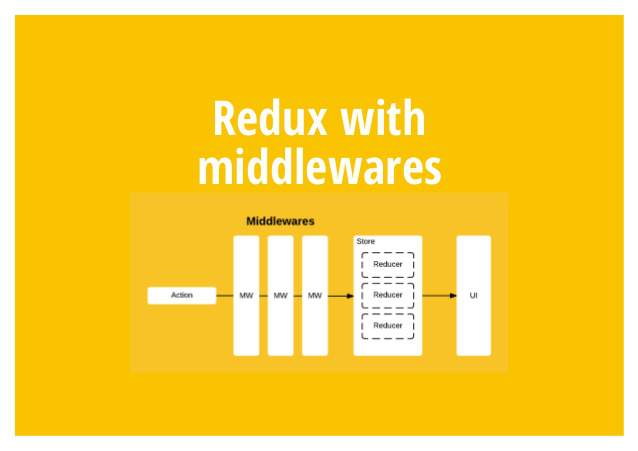
中间件
本文是在react native项目中使用redux,当然redux也可以在其他框架中使用,这里只是介绍一下使用的方式。
- Reducer:是一个纯函数,只是对state进行计算,不合适承担其他功能,也承担不了,因为理论上,纯函数不能进行读写操作。
- View:与 State 一一对应,可以看作 State 的视觉层,也不合适承担其他功能。
Action:存放数据的对象,即消息的载体,只能被别人操作,自己不能进行任何操作。
基于这样对特性只有在store.dispatch()方法中,添加。事例如下:
let next = store.dispatch;store.dispatch = function dispatchAndLog(action) {
console.log('dispatching', action);
next(action);
console.log('next state', store.getState());
}
这样我们就可以在action前后加上日志打印,这也是可以算上是中间件对雏形吧。
所以中间件就是一个函数,对原有函数进行改造,使其具有其他功能,对于RN项目来说就是在发出 Action 和执行 Reducer 这两步之间,添加了其他功能。redux异步使用
插件安装
npm i redux-logger --save (yarn add redux-logger --save)
npm i redux-thunk --save (yarn add redux-thunk --save)
**个人推荐yarn安装速度较快
node服务构建
本文通过异步请求来模拟,首先构建一个简单的node服务,如下:
const userInfo = {
status: 'login success',
isSuccess: true,
user: {
name: 'zhangsan',
id: 1,
phoneNumber: '18888888888',
age: 23,
}
};const http = require('http');
const server = http.createServer((request, response) => {
response.writeHead(200, {'content-type': 'application/json'});
response.write(JSON.stringify(userInfo));
response.end();
})server.listen(3001);
console.info('listen port is 3001...')
action、reducer、api构建
Action构建如下:
export function login_doing(data) {
    return {
        type: types.LOGIN_IN_DOING,
        data
    }
}

export function login_done(data) {
    return {
        type: types.LOGIN_IN_DONE,
        data,
    }
}

export function login_err(data) {
    return {
        type: types.LOGIN_IN_ERROR,
        data,
    }
}

export function login_out(data) {
    return {
        type: types.LOGIN_IN_OUT,
        data,
    }
}

export function login_requ() {
    return loginService.getUserInfo()
}

reducer构建:
    export default function login(state = initState, action) {
    switch (action.type) {
        case loginTypes.LOGIN_IN_DOING:
            return {
                ...state,
                data: action.data
            }
        case loginTypes.LOGIN_IN_OUT:
            return {
                ...state,
                data: action.data
            }
        case loginTypes.LOGIN_IN_ERROR:
            return {
                ...state,
                data: action.data
            }
        case loginTypes.LOGIN_IN_DONE:
            action.data = JSON.parse(action.data)
            return {
                ...state,
                data: action.data
            }
        default:
            return state
    }
}

API构建:
    export function getUserInfo(params) {
    return dispatch => {
        dispatch(loginAction.login_doing(doingData));
        fetch('http://x.x.x.x:3001/') // 根据本机ip改写
            .then(res => {
                dispatch(loginAction.login_done(res._bodyText))
            })
            .catch(err => {
                loginAction.login_err(errData)
            })
    }
}
RN项目配置,中间件挂载
function configureStore(initialState) {
    return createStore(
        reducers,
        initialState,
        compose(applyMiddleware(thunk, createLogger))
    );
}

const store = configureStore();

export default store;
视图View构建
class Login extends Component {
    state = {
        text: ''
    }


    render() {
        // console.info('----->>>>>', JSON.stringify(this.props.store.getState().login))
        return <View>
            <TextInput
                style={{width: 220, height: 50, textAlign: 'center', borderColor: '#FF8247', borderWidth: 2}}
                placeholder={'input your name'}
                onChangeText={(text) => {
                    this.setState({text})
                }}
                value={this.state.text}
            />
            <View style={{flexDirection: 'row', justifyContent: 'space-between', marginTop: 20}}>
                <View style={{width: 100, height: 40, backgroundColor: '#FFEFD5', marginRight: 20}}>
                    <Button
                        onPress={() => {
                            this.props.store.dispatch(loginAction.login_requ())
                        }}
                        title="Login in"
                        color="#841584"
                    />
                </View>
                <View style={{width: 100, height: 40, backgroundColor: '#FFE1FF'}}>
                    <Button
                        color='red'
                        onPress={() => {
                            alert(2)
                        }}
                        title="Login out"
                    />
                </View>
            </View>
            <Text>{`username:${this.props.store.getState().login.data.user.name}`}</Text>
            <Text>{`age:${this.props.store.getState().login.data.user.age}`}</Text>
        </View>
    }

}

function mapStateToProps(store) {
    return {
        status: store.login.data.status,
        isSuccess: store.login.data.isSuccess,
        user: {
            name: store.login.data.user.name,
            id: store.login.data.user.id,
            phoneNumber: store.login.data.user.phoneNumber,
            age: store.login.data.user.age,
        }
    }
}

export default connect(mapStateToProps)(Login)
总结
通过以上构建就可以模拟redux异步使用了,具体参考:阮一峰redux讲解
上面代码中,所有中间件被放进了一个数组chain,然后嵌套执行,最后执行store.dispatch。可以看到,中间件内部(middlewareAPI)可以拿到getState和dispatch这两个方法。
