@lijiahong
2020-06-23T07:23:38.000000Z
字数 2728
阅读 409
centos7中将tomcat/nginx注册为系统服务
centos7 tomcat nginx 服务
tomcat
一、准备环境
操作系统:CentOS Linux release 7.6.1810 (Core)
export JAVA_HOME=/usr/local/jdk1.8.0_251export JRE_HOME=${JAVA_HOME}/jreexport CLASSPATH=.:${JAVA_HOME}/lib:${JRE_HOME}/lib:$CLASSPATHexport JAVA_PATH=${JAVA_HOME}/bin:${JRE_HOME}/binexport PATH=$PATH:${JAVA_PATH}
Tomcat:apache-tomcat-9.0.27
二、编辑catalina.sh
vi /usr/local/apache-tomcat-9.0.27/bin/catalina.sh#路径根据自己部署的位置来
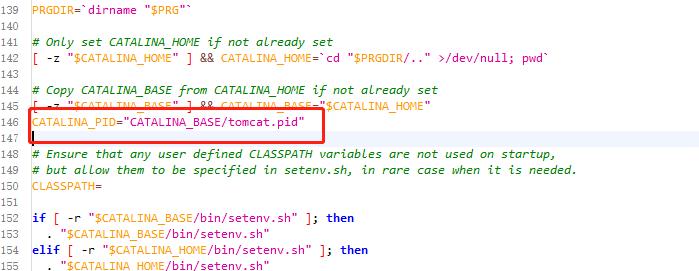
在CATALINA_BASE 参数的下一行,插入图片中红色框起来的内容:
CATALINA_PID="CATALINA_BASE/tomcat.pid"
然后退出并保存。
三、创建tomcat.service文件
vi /lib/systemd/system/tomcat.service
里面包含以下内容
[Unit]Description=tomcatAfter=network.target[Service]Type=forkingEnvironment="JAVA_HOME=/usr/local/jdk1.8.0_251"Environment='CATALINA_PID=/usr/local/apache-tomcat-9.0.31/bin/tomcat.pid'Environment="CATALINA_HOME=/usr/local/apache-tomcat-9.0.31/"Environment="CATALINA_BASE=/usr/local/apache-tomcat-9.0.31/"WorkingDirectory=/usr/local/apache-tomcat-9.0.31/bin/Environment='CATALINA_OPTS=-Xms1020M -Xmx2500M -server -XX:MaxPermSize=256m'ExecStart=/usr/local/apache-tomcat-9.0.31/bin/startup.shExecStop=/usr/local/apache-tomcat-9.0.31/bin/shutdown.shExecReload=/bin/kill -s HUP $MAINPIDPrivateTmp=true[Install]WantedBy=multi-user.target
以上内容要根据自己的部署位置确定。
四、启动
设置为开启机启动:
systemctl enable tomcat.service
启动服务:
systemctl start tomcat.service
停止服务:
systemctl stop tomcat.service
重启服务:
systemctl restart tomcat.service
检查状态:
systemctl status tomcat
第一步:从http://nginx.org/download/上下载相应的版本(或者wget http://nginx.org/download/nginx-1.5.9.tar.gz直接在Linux上用命令下载)
第二步:解压 tar -zxvf nginx-1.5.9.tar.gz
第三步:设置一下配置信息 ./configure --prefix=/usr/local/nginx ,或者不执行此步,直接默认配置
第四步:
make 编译 (make的过程是把各种语言写的源码文件,变成可执行文件和各种库文件)
make install 安装 (make install是把这些编译出来的可执行文件和库文件复制到合适的地方)
在配置信息的时候,也就是在第三步,出现了一下错误:
错误为:./configure: error: the HTTP rewrite module requires the PCRE library.
安装pcre-devel解决问题
yum -y install pcre-devel
还有可能出现:
错误提示:./configure: error: the HTTP cache module requires md5 functions
from OpenSSL library. You can either disable the module by using
--without-http-cache option, or install the OpenSSL library into the system,
or build the OpenSSL library statically from the source with nginx by using
--with-http_ssl_module --with-openssl=<path> options.
解决办法:
yum -y install openssl openssl-devel
安装后在linux下启动和关闭nginx:
启动操作
/usr/nginx/sbin/nginx/usr/nginx/sbin/nginx -t #查看配置信息是否正确
nginx配置文件
vi /lib/systemd/system/nginx.service
[Unit]Description=nginx - web serverAfter=network.target remote-fs.target nss-lookup.target[Service]Type=forkingPIDFile=/usr/local/nginx/logs/nginx.pidExecStartPre=/usr/local/nginx/sbin/nginx -t -c /usr/local/nginx/conf/nginx.confExecStart=/usr/local/nginx/sbin/nginx -c /usr/local/nginx/conf/nginx.confExecReload=/usr/local/nginx/sbin/nginx -s reloadExecStop=/usr/local/nginx/sbin/nginx -s stopExecQuit=/usr/local/nginx/sbin/nginx -s quitPrivateTmp=true[Install]WantedBy=multi-user.target
