@callofduty890
2022-05-10T09:13:51.000000Z
字数 6462
阅读 923
【Arraylist/List】/[Hashtable/Dictionary]-练习题
编程作业
ArrayList集合类型的基本操作
使用ArrayList类操作数组列表。
(1)分别创建并初始化源字符串数组列表ArrayList({”0”,”2”,”4”,”6”})和目标字符串数组列表ArrayList({”1”,”3”,”5”,”7”,”9”})。
(2)测试CopyTo的功能,将源ArrayList的第二个元素内容复制到目标ArraylList索引为3的位置。
(3)源数组列表ArravList重新赋值为整数类型型({0,2,4。6。8 ,10 ,12} )。
(4),测试Remove的功能,先移除ArrayList中值为4的元素,再移除索引为4处的元素。
(5),测试Insert的功能,将元素400插入到ArrayList中、索引为2的位置。
(6)遍历数组列表ArrayList中的所有元素。
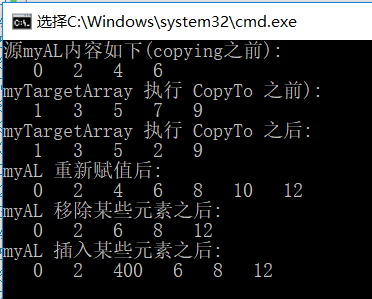
static void Main(string[] args){//初始化并装进一个新的字符串数组列表ArrayList myAL = new ArrayList();myAL.Add("0"); myAL.Add("2"); myAL.Add("4"); myAL.Add("6");//myTargetArray数组string[] myTargetArray = new string[5];myTargetArray[0] = "1";myTargetArray[1] = "3";myTargetArray[2] = "5";myTargetArray[3] = "7";myTargetArray[4] = "9";//显示myALConsole.WriteLine("源myAL内容如下(Copying)之前");PrinValues(myAL, " ");//显示myTargetArrayConsole.WriteLine("源myTargetArray内容如下(Copying)之前");PrinValues(myTargetArray, " ");//执行CopyTomyAL.CopyTo(1, myTargetArray, 3, 1);Console.WriteLine("源myTargetArray执行copyTo之后");PrinValues(myTargetArray, " ");//清空数组myAL.Clear();//重新赋值myAL.Add("0");myAL.Add("2");myAL.Add("4");myAL.Add("6");myAL.Add("8");myAL.Add("10");myAL.Add("12");Console.WriteLine("myAL 重新赋值之后");PrinValues(myAL, " ");//移除某些元素myAL.Remove("4");//移除字符串为"4"myAL.RemoveAt(4);//移除索引为4的值Console.WriteLine("myAL 移除某些元素之后");PrinValues(myAL, " ");//插入指定元素myAL.Insert(2, 400);Console.WriteLine("myAl 插入某些元素之后");PrinValues(myAL, " ");Console.ReadKey();}/// <summary>/// 遍历输出内容/// </summary>/// <param name="myList">列表内容</param>/// <param name="mySqparasrtor">间隔字符串</param>public static void PrinValues(IEnumerable myList, string mySqparasrtor){foreach (var item in myList){Console.Write("{0} {1}", mySqparasrtor, item);}Console.WriteLine();//换行方便下一轮的输出}
List 泛型集合类型的基本操作
使用List泛型类操作整数列表。
(1)创建一个空的List< int>,并使用Add方法添加0一8中的偶数。
(2)测试List< int>的Count属性和Capacity属性。
(3)使用Contains方法测试元素6是否存在。
(4)测试Insert的功能,将元素4插入到List< int>中的指定索引2处
(5)使用Item属性(在C#中为索引器)检索List< int>中索引为3的元素。
(6)测试Remove的功能,删除List< int>中的元素4。
(7)遍历List< int>中的所有元素。
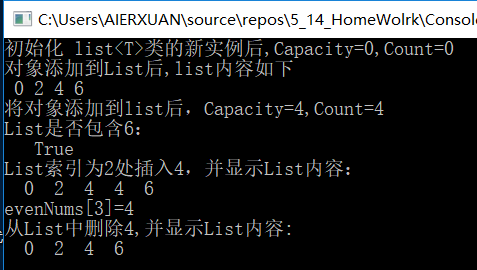
static void Main(string[] args){//初始化ListList<int> evenNums = new List<int>();Console.WriteLine("初始化List<int>类的新实例化之后,Capacity={0},Count={1}", evenNums.Capacity, evenNums.Count);//添加偶数for (int i = 0; i < 4; i++){evenNums.Add(i * 2);}Console.WriteLine("对象添加到List之后,List的内容如下");foreach (var item in evenNums){Console.Write(" " + item);}Console.WriteLine("\n将对象添加到List之后,Capacity={0},Count={1}", evenNums.Capacity, evenNums.Count);Console.WriteLine("List是否包含6: \n {0}", evenNums.Contains(6));Console.WriteLine("List索引值2处插入4,并显示List内容:");evenNums.Insert(2, 4);foreach (var item in evenNums){Console.Write(" " + item);}Console.WriteLine("\n evenNums[3]={0}", evenNums[3]);Console.WriteLine("从List中删除4,并显示List内容");evenNums.Remove(4);//删除4//遍历输出内容foreach (var item in evenNums){Console.Write(" " + item);}Console.ReadKey();}
Hashtable 集合类型的基本操作
(1)创建一个空的Hashtable,并使用Add方法添加一些元素。在尝试添加重复的键时,Add方法将引发ArgumentException。
(2)使用Item属性(在C#中为索引器)来检索、设置、替换值。
(3)在调用Add方法添加元素之前,使用ContainsKey方法测试键是否存在。
(4)使用Remove肯法刪除key/value对。
(5)使用两种方法枚举字典中的键和值。
①方法一:利用foreach枚举Hashtable中每个元素。
②方法二:使用Keys属性获取并枚举Hashtable的所有keys清单;使用Values属性获取并枚举Hashtable的所有Values清单。
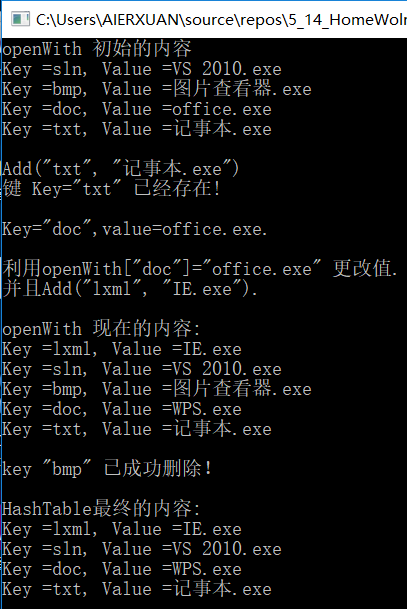
static void Main(string[] args){//创建哈希表Hashtable openwith = new Hashtable();//添加元素openwith.Add("txt", "记事本.exe");openwith.Add("bmp", "图片查看器.exe");openwith.Add("sln", "vs2019.exe");openwith.Add("doc", "office.exe");//显示HashTable的内容Console.WriteLine("openwith 初始化的内容");PrinKeyAndValues1(openwith);//判断是是否存在一个key值,使用add方法Console.WriteLine("Add(\"txt\",\"记事本.exe\")");try{openwith.Add("txt","记事本.exe");}catch{Console.WriteLine("键 Key=\"txt\" 已存在!");}//Hashtable的Item属性是默认值,可以利用Key获取valueConsole.WriteLine("\nKey=\"doc\",value={0},openwith[\"doc\"]", openwith["doc"]);//利用item修改Console.WriteLine("\n利用openWith[\"doc\"]=office.exe 更改值.");openwith["doc"] = "WPS.exe";Console.WriteLine("使用Add(\"lxml\",\"IE.exe\")");//查找元素if (!openwith.ContainsKey("lxml")){openwith.Add("lxml", "IE.exe");}else{Console.WriteLine("已经存在无法添加");}//显示内容Console.WriteLine("\nopenwith 显示内容");PrinKeyAndValues2(openwith);//利用Remove方法删除Key/Valueopenwith.Remove("bmp");//判断bmp是否被成功删除if (!openwith.Contains("bmp")){Console.WriteLine("\"Key\"=\"bmp\" 已成功删除! ");}//显示全部内容Console.WriteLine("\n HashTable最终的内容:");PrinKeyAndValues2(openwith);Console.ReadKey();}public static void PrinKeyAndValues1(Hashtable myTable){foreach (var item in myTable.Keys){Console.WriteLine("Key={0},Value={1}", item, myTable[item]);}Console.WriteLine();}public static void PrinKeyAndValues2(Hashtable myTable){foreach (DictionaryEntry item in myTable){Console.WriteLine("Key={0},Value={1}", item.Key, item.Value);}Console.WriteLine();}
Dictionary泛型集合类型的基本操作
:使用Dictionary泛型类操作数据集合。
(1),创建一个空的带有字符串键的字符串Dictionary< TKey,TValue>,并使用Add方法添加一些元素。在添加重复的键时,Add方法将引发ArgumentException。
(2)使用Item属性来更改、设置、检索值。
(3)使用TryGetValue方法检索词典中的键值。
(4)在调用Add方法之前使用ContainsKey方法测试键是否存在。
(5)使用Remove方法删除key/value对。
(6)使用两种方法枚举字典中的键和值。
①方法一:利用foreach枚举Dictionary中每个元素。
②方法二:使用Keys属性获取并枚举Dictionary的所有Keys清单;使用Values属性获取并枚举Dictionary的所有Values清单。
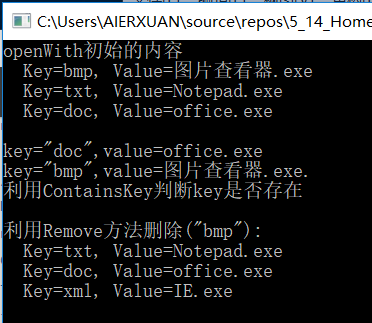
static void Main(string[] args){//创建一个新的 Dictionary<string, string>Dictionary<string, string> openWith = new Dictionary<string, string>();//Dictionary 中增加元素,注意:key不许不相同,value可以相同openWith.Add("bmp", "图片查看器.exe");openWith.Add("txt", "Notepad.exe");openWith.Add("doc", "office.exe");//显示Dictionary初始内容Console.WriteLine("openWith初始的内容");PrintKeysAndValues1(openWith);//利用Dictionary[key]获取valueConsole.WriteLine("\nkey=\"doc\",value={0} ", openWith["doc"]);//利用TryGetValue方法获取与指定的键相关联的值string value = "";if (openWith.TryGetValue("bmp", out value)){Console.WriteLine("key=\"bmp\",value={0}. ", value);}else{Console.WriteLine("Key=\"bmp\" is not found ");}//利用ContainsKey方法判断Key是否存在Console.WriteLine("利用ContainsKey判断key是否存在");Console.WriteLine();if (!openWith.ContainsKey("XML")){openWith.Add("xml", "IE.exe");}//利用Remve方法删除 key/values对Console.WriteLine("利用Remove方法删除(\"bmp\"):");openWith.Remove("bmp");//显示Dictionary的内容PrintKeysAndValues1(openWith);//Console.ReadLine();}//使用两种方法枚举字典中的键和值public static void PrintKeysAndValues1(Dictionary<string, string> myDictionary){//利用foreach枚举Dictionary中的每一个元素foreach (KeyValuePair<string, string> KeyValue in myDictionary){Console.WriteLine(" Key={0}, Value={1}", KeyValue.Key, KeyValue.Value);}}public static void PrintKeysAndValues2(Dictionary<string, string> myDictionary){//使用Keys属性,获取dictionary的所有Keys清单Dictionary<string, string>.KeyCollection MyKeys = myDictionary.Keys;Console.WriteLine("Dictionary所有Key的值:");foreach (string item in MyKeys){Console.WriteLine(" Key = {0}", item);}//使用Values属性,获取Dictionary所有Values清单Dictionary<string, string>.ValueCollection MyValues = myDictionary.Values;Console.WriteLine("Dictionary所有Values的值:");foreach (string item in MyValues){Console.WriteLine(" Values = {0}", item);}}
