@wwanghee
2017-03-28T01:50:04.000000Z
字数 1237
阅读 610
【腾讯项目】Gulp插件系列—venus版本号接入指南
一、背景
前端构建工程的最佳实践就是CDN文件通过HASH发布,最后发布入口文件,这样的发布方式可靠,版本控制方便,便于各个版本的控制。
二、gulpfile.js文件的新旧差异
venus系统的编译虽然是在服务端,但是依赖于本地的gulpfile.js文件,gulpfile的任务流程WONDER重新梳理了一下。如下图所示:
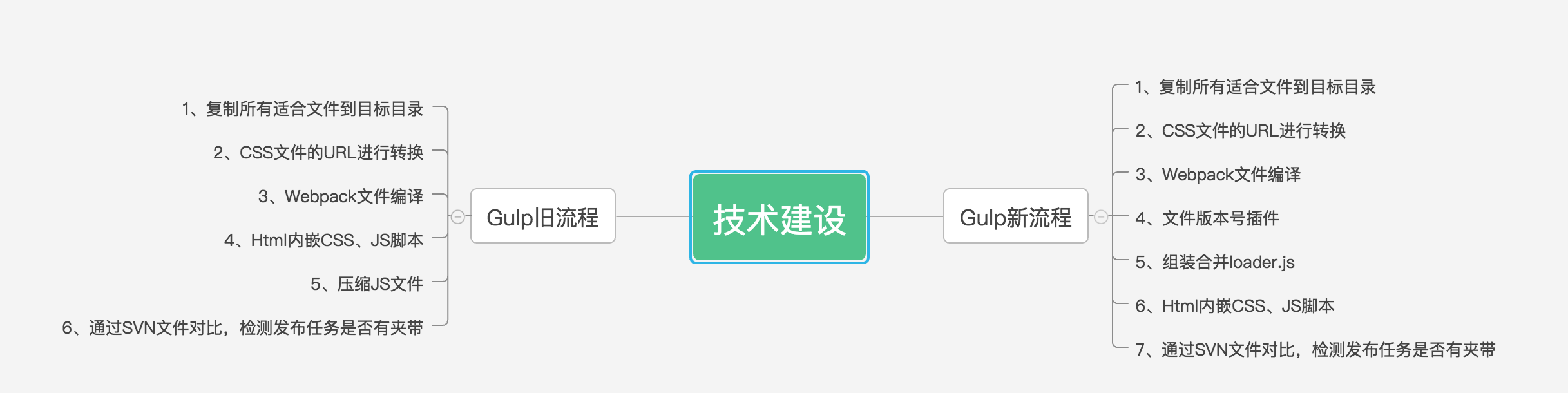
和现在的gulpfile.js文件有一定的区别,但是也相对更合理和思路清晰一些。
三、接入指南
1、SVN更新最新的package.json文件,并执行如下命令:
sudo tnpm install
2、新流程的gulpfile.js参考名片的gulpfile.js
主要是增加了两个Gulp任务,第一个是生成hash文件和mainfest文件的任务
gulp.task('rev', ['webpack'], function () {console.log('rev task start');return gulp.src([destPath + '/js/*.js', '!' + destPath + '/js/*.loader.js']).pipe(rev()).pipe(revFormat({prefix: '.',suffix: '.min',lastExt: true})).pipe(uglify()).pipe(gulp.dest(destPath + '/js/dist')).pipe(rev.manifest({path: 'manifest.json'})).pipe(revDel({ dest: destPath + '/js/dist', force: true })).pipe(gulp.dest(destPath + '/js'))});
第二个是和本地的loader.js进行替换的合并任务
gulp.task('concat', ['rev'], function () {console.log('concat task start');var manifest = {};try {manifest = JSON.parse(fs.readFileSync(destPath + '/js/manifest.json', 'utf-8').toString());} catch (e) {}return gulp.src([destPath + '/js/*.loader.js']).pipe(tap(function (file, utils) {console.log(manifest);for (var key in manifest) {console.log(key);file.contents = new Buffer(String(file.contents).replace(new RegExp(key), 'dist/' + manifest[key]));}})).pipe(gulp.dest(destPath + '/js'));});
