@floatsd
2018-01-18T13:00:19.000000Z
字数 30024
阅读 1360
二进制位运算游戏 Binary bit Trace
CM4实验报告
游戏简介
游戏规则
- Binary bit Trace是一个用Ti公司TM4C1294XL实验开发板的,用板子上自带的一圈八个led模拟两个四位二进制数,进行计算的益智类小游戏。游戏规则如下图:
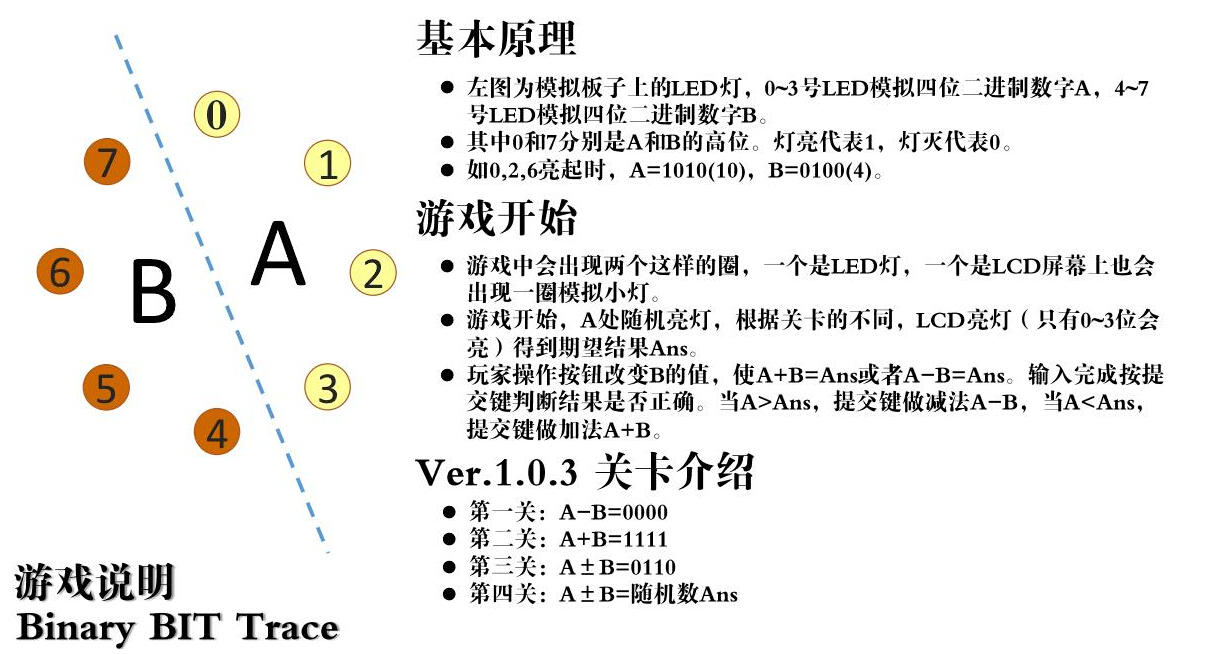
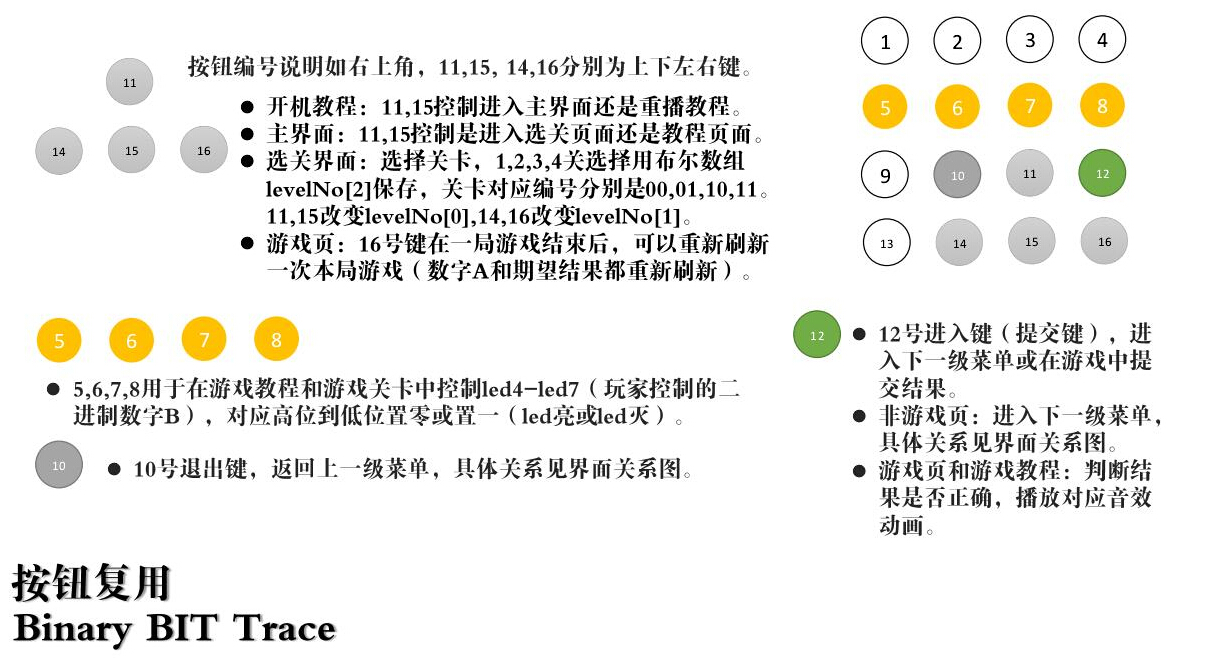
- 游戏的所有操作由按键完成,没有使用LCD本身的触摸屏功能。
功能模块
- GPIO:矩阵键盘,LED,蜂鸣器
| 信号 | 端口 | 信号 | 端口 |
|---|---|---|---|
| LED0 | PF1 | LED1 | PF2 |
| LED2 | PF3 | LED3 | PL0 |
| LED4 | PL1 | LED5 | PL2 |
| LED6 | PL3 | LED7 | PL4 |
| ROW1_IN | PP2 | COL1_OUT | PD1 |
| ROW2_IN | PN3 | COL2_OUT | PH3 |
| ROW3_IN | PN2 | COL3_OUT | PH2 |
| ROW4_IN | PD0 | COL4_OUT | PM3 |
| BUZZER | PM5 |
- 定时器
总共8个定时器模块,每个模块两路输出,在中断向量表里,以Timer0和Timer1为例。 实验中使用Timer0B,其地址调用如TimerEnable(TIMER0_BASE, TIMER_B);
IntDefaultHandler, // Timer 0 subtimer ATIMER0B_Handler, // Timer 0 subtimer BIntDefaultHandler, // Timer 1 subtimer AIntDefaultHandler, // Timer 1 subtimer B
- LCD屏
| 信号 | 端口 | 信号 | 端口 |
|---|---|---|---|
| CS | PE1 | BLACKLIGHT | PF1 |
| LCD_RESET | PF4 | LCD_BUSY | PB1 |
| PEN* | PB0 | RS | PP5 |
| IMO | PL5 | WR | PE2 |
| RD | PE0 | DATA0-15 |
实验原理
游戏设计
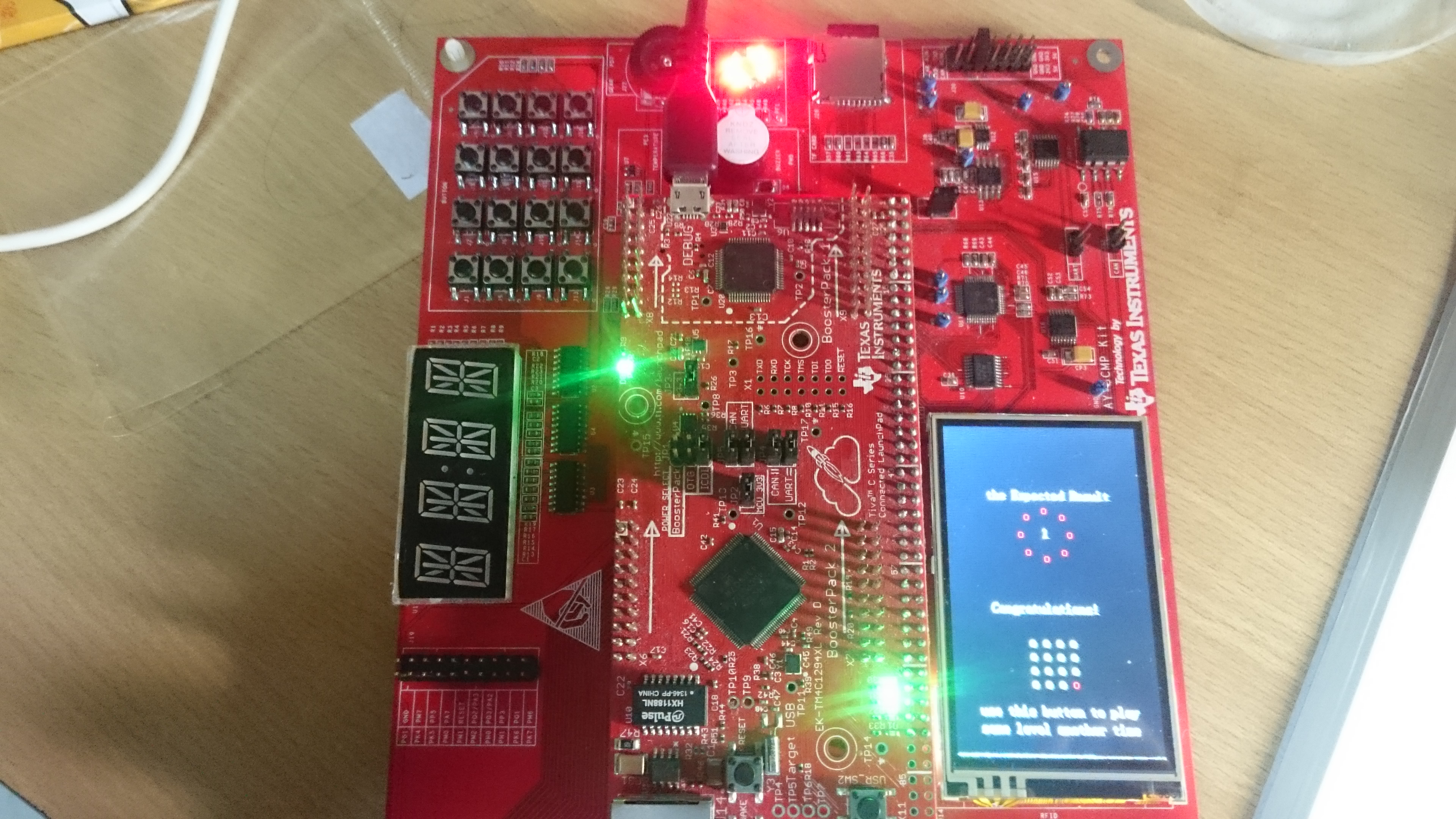
- 用定时器中断扫描按键,每个界面都有一个固有ID,按键执行程序前判断ID,在不同的页面有不同的功能。
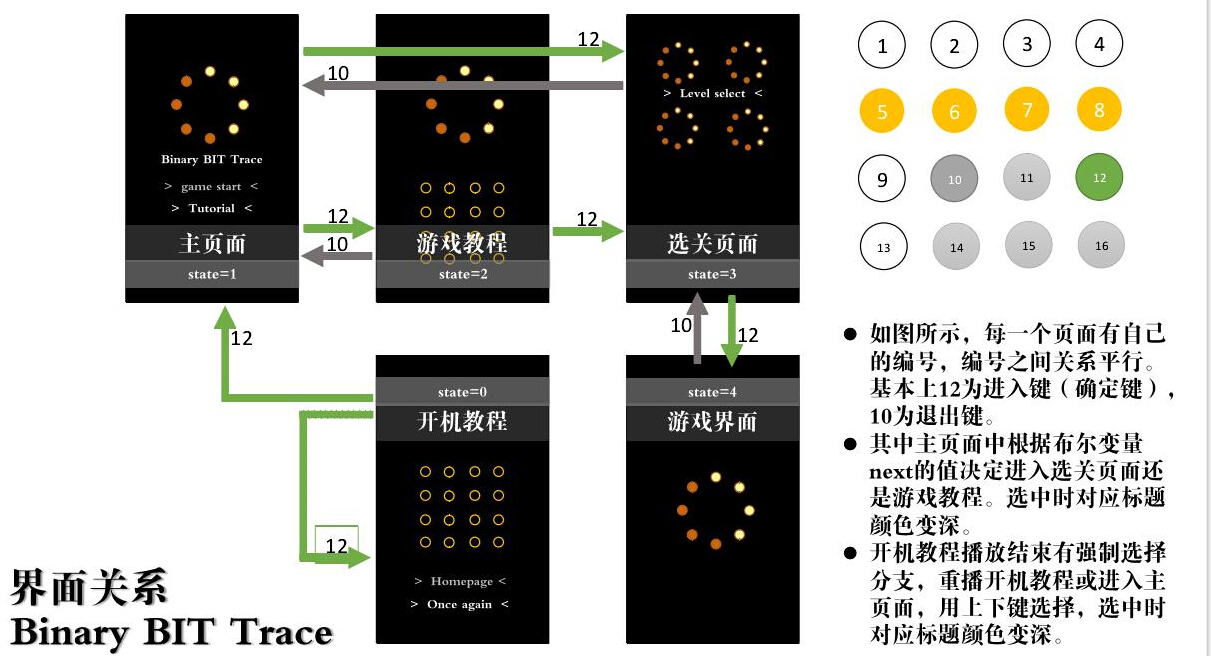
具体模块原理
中断
- 中断,即是是当前程序跳出,执行中断跳出。执行完当前中断后再返回去。中断可循环嵌套,高级中断可以打断低级中断,反过来则不行。原理如图所示:
![1.jpg-46.9kB][4-1] - TM4C1294有114个中断源,八个中断优先级,如果没有设置优先级,则自动按中断向量表的顺序,小的优先来排列。
- 使用中断时,照例要初始化系统时钟,然后是使能各个需要用到的外设,在向量表里改变中断向量,声明并编写中断函数,其中可以产生中断的外设也有相应的库函数,要利用这些函数做一个外设关于中断的初始化,由此开启相应中断,因此要包含头文件
"interrupt.h"。
系统时钟
- 系统时钟SysClk可以由板子上的任意一个时钟源直接提供,也可以通过内部主PLL提供,也可以由PIOSC的四分频(4MHz±1%)提供。
- PLL(Phase Locked Loop), 为锁相回路或锁相环, 用来统一整合时脉讯号,使内存能正确的存取资料。PLL用于振荡器中的反馈技术。 许多电子设备要正常工作,通常需要外部的输入信号与内部的振荡信号同步,利用锁相环路就可以实现这个目的。
- TM4C1294的四个时钟源分别是
- 精密内部振荡器PIOSC
- 主振荡器MOSC
- 低频内部振荡器LFIOSC
- 休眠模块时钟
- 初始化和配置系统时钟的函数如下:
/******************************************************************** 函数: Clock_Init()* 描述: 配置使能系统时钟* 输入值:无* 返回值:无*****************************************************************/void Clock_Init(){SysCtlClockFreqSet((SYSCTL_XTAL_25MHZ |//外部时钟25MHzSYSCTL_OSC_MAIN |//OSC时钟源选择主振荡器作为OSCSYSCTL_USE_PLL |//采用锁相环PLL作为系统时钟源SYSCTL_CFG_VCO_480), //压控振荡器频率480MHzsysClock_Fr);//设定系统频率为sysClock_Fr}
- 该函数原型是
uint32_t SysCtlClockFreqSet(uint32_t ui32Config,这里
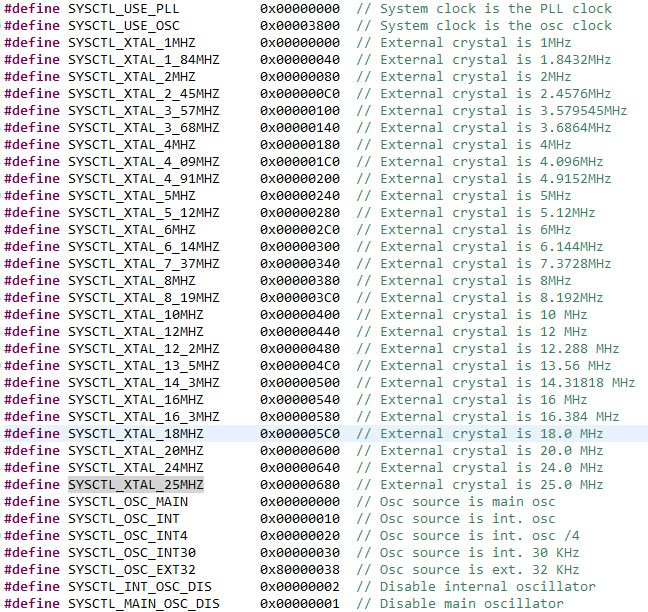
uint32_t ui32SysClock);ui32Config表示时钟配置,例如外部时钟,是否使用PLL,时钟源设置等,它的其他可选项如下图:
GPIO
- GPIO(General Purpose Input Output)通用输入输出端口,GPIO模块包括15个物理GPIO块,每个GPIO块对应一个单独的GPIO端口,每个端口对应多个管脚。
- GPIO要说分类的话应该算是一种数字化的信息传递方式,或者说操作模式,每个独立管脚可以输入也可以输出,用户可以通过指令修改(用库函数修改状态寄存器或直接修改寄存器)来配置数据方向操作,方向为输入时,数据寄存器是处在一种读取管脚状态的模式,对应方向输出时用户可以改变GPIO端口状态。
- 每一个管脚的状态独立,不会影响其它管脚的状态。
可以快速切换,每个时钟周期、实现一次变化。
内部上电复位时所有GPIO管脚都被配置成无驱动模式,具体过程配合代码叙述。
/******************************************************************** 函数: LED_Init()* 描述: LED的配置及初始化* 输入值:无* 返回值:无*****************************************************************/void LED_Init(){//使能GPIOF和GPIOL模块SysCtlPeripheralEnable(SYSCTL_PERIPH_GPIOF);SysCtlPeripheralEnable(SYSCTL_PERIPH_GPIOL);//将8盏LED配置为输出模式(GPIO管脚方向)GPIOPinTypeGPIOOutput(GPIO_PORTF_BASE,GPIO_PIN_1|GPIO_PIN_2|GPIO_PIN_3);GPIOPinTypeGPIOOutput(GPIO_PORTL_BASE,GPIO_PIN_0|GPIO_PIN_1|GPIO_PIN_2|GPIO_PIN_3|GPIO_PIN_4);}
矩阵按钮
- 矩阵按键也是用的GPIO口,它有4行乘4列共16个按键,大概长这样:
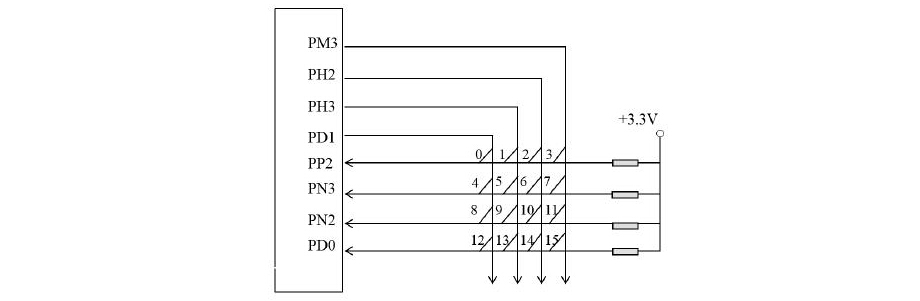
- 如图所示,虽然有16个按键,但是控制它的GPIO口只有4行4列共计8个。实验中我们把列配置为输入,行配置为输出,某一时刻只让一条列线处于低电平,其余列线均处于高电平,不停的轮循列,而当某一行有健按下时,该键所在的行变为低电平。当某行某列都为低电平时,该按键就会被判断是按下的。行和列的信号分配如下表:
| 信号 | 端口 | 信号 | 端口 |
|---|---|---|---|
| ROW1_IN | PP2 | COL1_OUT | PD1 |
| ROW2_IN | PN3 | COL2_OUT | PH3 |
| ROW3_IN | PN2 | COL3_OUT | PH2 |
| ROW4_IN | PD0 | COL4_OUT | PM3 |
- 软件消抖原理:检测到有键闭合后执行一个小延时,再检测一次还是按下,才是真的按下。当检测到按键释放后,也给一个小的延时,检测第二遍。这个延时时间要比抖动时间长,一般是5~20ms。
- 实验程序流程:
- 定时器
总共8个定时器模块,每个模块两路输出,在中断向量表里,以Timer0和Timer1为例。 实验中使用Timer0B,其地址调用如TimerEnable(TIMER0_BASE, TIMER_B);
IntDefaultHandler, // Timer 0 subtimer ATIMER0B_Handler, // Timer 0 subtimer BIntDefaultHandler, // Timer 1 subtimer AIntDefaultHandler, // Timer 1 subtimer B
LCD屏
TFT彩屏工作原理
TFT(Thin Film Transistor)LCD即薄膜场效应晶体管LCD,是有源矩阵类型液晶显示器(AM-LCD)中的一种。和TN技术不同的是TFT的显示采用“背透式”照射方式——假想的光源路径不是像TN液晶那样从上至下,而是从下向上。这样的作法是在液晶的背部设置特殊光管,光源照射时通过下偏光板向上透出。由于上下夹层的电极改成FET电极和共通电极,在FET电极导通时,液晶分子的表现也会发生改变,可以通过遮光和透光来达到显示的目的,响应时间大大提高到80ms左右。因其具有比TN LCD更高的对比度和更丰富的色彩,荧屏更新频率也更快,故TFT俗称真彩。
LCD是由二层玻璃基板夹住液晶组成的,形成一个平行板电容器,通过嵌入在下玻璃基板上的TFT对这个电容器和内置的存储电容充电,维持每幅图像所需要的电压直到下一幅画面更新。液晶的彩色都是透明的必须给LCD衬以白色的背光板上才能将五颜六色表出来,而要使白色的背光板有反射就需要在四周加上白色灯光。因此在TFT LCD的底部组合了灯具,如CCFL或者LED。
OTM4001A
- 控制芯片简介OTM4001A是一款262144色,用于中小型TFT LCD 显示屏的片上系统(SoC)驱动芯片, 通过指定用于图形数据的RAM能支持达240x RGBx432分辨率。OTM4001A内部的时序控制器能为不同的需求提供不同接口方式,OTM4001A提供了系统接口,包括8/9/16/18位并口和SPI串口方式(本实验采用16位并口方式)OTM4001A也提供了6/16/18位RGB接口,用于动态显示图片。OTM4001A的主要特性还有窗口地址功能能限制数据重写区域,并减少数据传输;内部6位D/A转换器输出的64γ颜色校准;内部233280字节的RAM;背光引脚输出控制的内置自适应背光控制功能(CABC);逻辑供电电压范围2.5~3.6V,IO接口支持操作电压1.65~3.6V,模拟供电电压范围2.5~3.6V;内置的内部晶振与硬件复位。
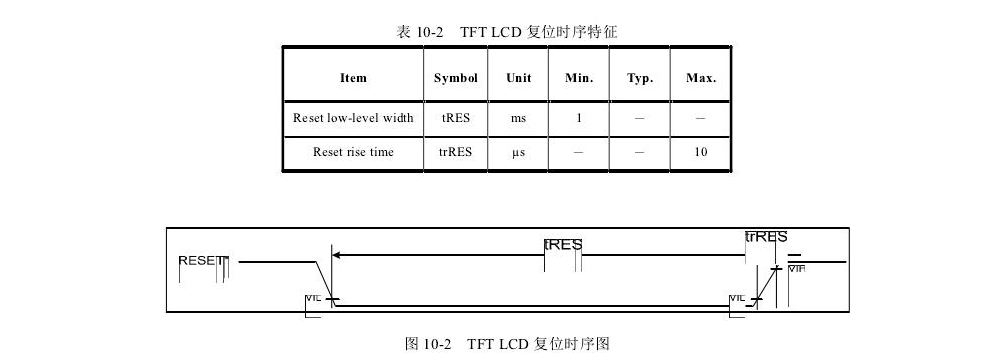
- 为使液晶正常工作,我们需要在初始化之前先复位液晶,复位液晶的时序特征和时序图如下:
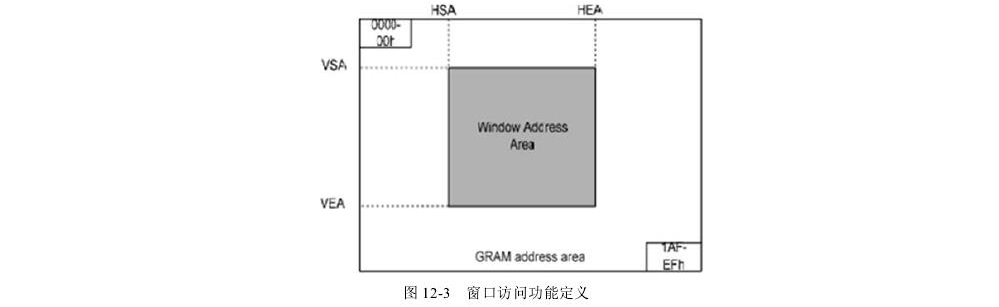
- 为减少数据访问次数,OTM4001A还有窗口访问功能,能指定对液晶的操作区域,相关寄存器如下:
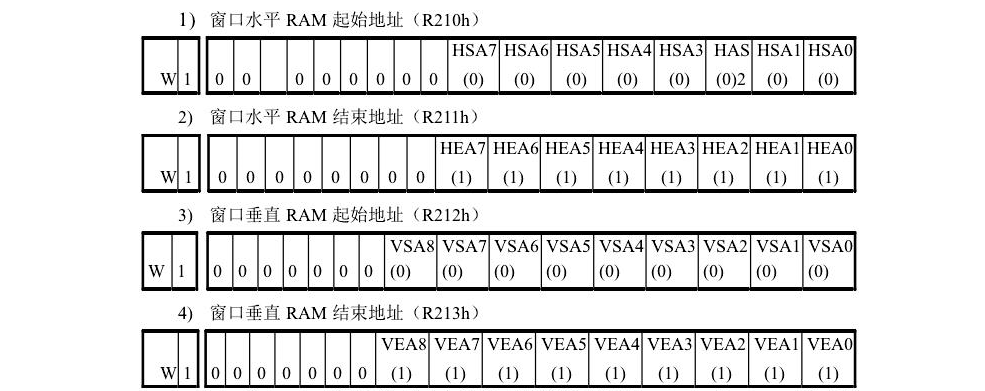
HSA7-0和HEA7-0代表了水平方向的窗口起始和结束地址,VSA8-0和VEA8-0
代表垂直方向的窗口起始和结束地址。要使用窗口功能需满足下式:
“00”h ≤ HSA7-0< HEA7-0 ≤ “EF”h and HEA-HAS>=”04h”
“00”h ≤ VSA8-0< VEA8-0 ≤ 9’h1AF
对窗口访问功能定义如下图:
实验代码
- 全局变量
#ifdef TIMER_C_#define TIMER_C_Extern#else#define TIMER_C_Extern extern#endifTIMER_C_Extern volatile uint8_t TimerCounter;TIMER_C_Extern volatile uint16_t gate;TIMER_C_Extern volatile uint8_t state;TIMER_C_Extern uint8_t timer[4];TIMER_C_Extern uint8_t bitA,Ans,levelNo[2];TIMER_C_Extern bool next_home,bitB[4],welcome_t;
- 定时器中断
/******************************************************************** 函数: TIMER0B_Handler()* 描述: 定时器中断函数扫描按键* 输入值:无* 返回值:无*****************************************************************/void TIMER0B_Handler(){TimerCounter++;if(TimerCounter%10 == 0){Button_run();}TimerIntClear(TIMER0_BASE, TIMER_TIMB_TIMEOUT);}
- 按钮扫描(本体在学期实验报告第二章)
/******************************************************************** 函数: Button_run()* 描述: 按键扫描,执行相应函数* 输入值:无* 返回值:无*****************************************************************/void Button_run(){uint8_t Key = Button_Scan();switch(Key){case J1: break;case J2: break;case J3: buzzer_run(500000);button3();break;case J4: break;case J5: buzzer_run(500000);button5();break;case J6: buzzer_run(500000);button6();break;case J7: buzzer_run(500000);button7();break;case J8: break;case J9: buzzer_run(500000);button9();break;case J10: buzzer_run(500000);button10();break;case J11: buzzer_run(500000);button11();break;case J12: break;case J13:buzzer_run(500000); button13();break;case J14: buzzer_run(500000);button14();break;case J15: buzzer_run(500000);button15();break;case J16: break;default: break;}}
- 按钮应用函数
/******************************************************************** 函数: button14()* 描述: 进入键,提交键* 输入值:无* 返回值:无*****************************************************************/void button14(){x=120,y=120,x44,y44,i;switch(state){case 0:{if(welcome_t==0){state=9;page_home();}else video_tutorial_Init();};break;case 1:{if(next_home==0){page_selectLevel();}else{video_tutorial();}};break;case 2:{if((bitA+binary_decimalism(bitB)==Ans)||(bitA-binary_decimalism(bitB)==Ans)){for(i=0;i<5;i=i+4){buzzer_change(15-i,1+i,40);}TFTLCD_showLed(x,y,RED,BLACK,8);Delay(10000);TFTLCD_showLed(x,y,CYAN,BLACK,8);Delay(10000);TFTLCD_showLed(x,y,RED,BLACK,8);Delay(10000);TFTLCD_showLed(x,y,CYAN,BLACK,8);Delay(10000);TFTLCD_showLed(x,y,RED,BLACK,8);TFTLCD_CLEAR(BLACK);TFTLCD_ShowString(50,220,"Congratulations!",WHITE,BLACK,400000);TFTLCD_ShowString(50,250,"now have fun",WHITE,BLACK,300000);Delay(8000000);page_selectLevel();}else{buzzer_change(1,15,40);Delay(50000);buzzer_change(1,15,40);TFTLCD_ShowString(50,220,"try again",WHITE,BLACK,300000);}};break;case 3:page_game();break;case 4:{x=120,y=120,x44=92,y44=260;int i;if((bitA+binary_decimalism(bitB)==Ans)||(bitA-binary_decimalism(bitB)==Ans)){for(i=0;i<5;i=i+4){buzzer_change(15-i,1+i,40);}TFTLCD_showLed(x,y,RED,BLACK,8);Delay(10000);TFTLCD_showLed(x,y,CYAN,BLACK,8);Delay(10000);TFTLCD_showLed(x,y,RED,BLACK,8);Delay(10000);TFTLCD_showLed(x,y,CYAN,BLACK,8);Delay(10000);TFTLCD_showLed(x,y,RED,BLACK,8);TFTLCD_ShowString(50,220,"Congratulations!",WHITE,BLACK,300000);Delay(3000000);TFTLCD_showButton(x44,y44,CYAN,BLACK,0);TFTLCD_ShowString(30,y44+80,"use this button to play",WHITE,BLACK,100000);TFTLCD_ShowString(30,y44+100,"same level another time",WHITE,BLACK,100000);for(i=0;i<3;i++){TFTLCD_showButton(x44,y44,RED,BLACK,16);Delay(10000);TFTLCD_showButton(x44,y44,CYAN,BLACK,16);Delay(10000);}TFTLCD_showButton(x44,y44,RED,BLACK,16);}};break;}}/******************************************************************** 函数: button6()* 描述: 返回键* 输入值:无* 返回值:无*****************************************************************/void button6(){switch(state){case 1:break;case 2:page_home();break;case 3:page_home();break;case 4:ledclose();page_selectLevel();break;}}/******************************************************************** 函数: button10()* 描述: 上* 输入值:无* 返回值:无*****************************************************************/void button10(){int x1=70,x2=170,y1=60,y2=160;switch(state){case 0:{if(welcome_t==0){TFTLCD_ShowString(92,120,"> yes <",WHITE,BLACK,10000);TFTLCD_ShowString(92,140,">not yet<",LBBLUE,BLACK,10000);welcome_t=1;Delay(3000);}else{TFTLCD_ShowString(92,120,"> yes <",LBBLUE,BLACK,10000);TFTLCD_ShowString(92,140,">not yet<",WHITE,BLACK,10000);welcome_t=0;Delay(3000);}};break;case 1:{if(next_home==0){TFTLCD_ShowString(60,250,"> Game Start <",WHITE,BLACK,1);next_home=1;TFTLCD_ShowString(68,290,"> Tutorial <",LBBLUE,BLACK,1);Delay(3000);}else {TFTLCD_ShowString(68,290,"> Tutorial <",WHITE,BLACK,1);next_home=0;TFTLCD_ShowString(60,250,"> Game Start <",LBBLUE,BLACK,1);Delay(3000);}};break;case 2:break;case 3:{if(levelNo[0]==0){TFTLCD_showLed(x1,y1,CYAN,BLACK,8);TFTLCD_showLed(x1,y2,CYAN,BLACK,8);TFTLCD_showLed(x2,y1,CYAN,BLACK,8);TFTLCD_showLed(x2,y2,CYAN,BLACK,8);levelNo[0]=1;}else{TFTLCD_showLed(x1,y1,CYAN,BLACK,8);TFTLCD_showLed(x1,y2,CYAN,BLACK,8);TFTLCD_showLed(x2,y1,CYAN,BLACK,8);TFTLCD_showLed(x2,y2,CYAN,BLACK,8);levelNo[0]=0;}};break;case 4:break;default:break;}}/******************************************************************** 函数: button9()* 描述: 下* 输入值:无* 返回值:无*****************************************************************/void button9(){int x1=70,x2=170,y1=60,y2=160;switch(state){case 0:{if(welcome_t==0){TFTLCD_ShowString(92,120,"> yes <",WHITE,BLACK,1);TFTLCD_ShowString(92,140,">not yet<",LBBLUE,BLACK,1);welcome_t=1;Delay(3000);}else{TFTLCD_ShowString(92,120,"> yes <",LBBLUE,BLACK,1);TFTLCD_ShowString(92,140,">not yet<",WHITE,BLACK,1);welcome_t=0;Delay(3000);}};break;case 1:{if(next_home==0){TFTLCD_ShowString(60,250,"> Game Start <",WHITE,BLACK,1);next_home=1;TFTLCD_ShowString(68,290,"> Tutorial <",LBBLUE,BLACK,1);Delay(3000);}else {TFTLCD_ShowString(68,290,"> Tutorial <",WHITE,BLACK,1);next_home=0;TFTLCD_ShowString(60,250,"> Game Start <",LBBLUE,BLACK,1);Delay(3000);}};break;case 2:break;case 3:{if(levelNo[0]==1){TFTLCD_showLed(x1,y1,CYAN,BLACK,8);TFTLCD_showLed(x1,y2,CYAN,BLACK,8);TFTLCD_showLed(x2,y1,CYAN,BLACK,8);TFTLCD_showLed(x2,y2,CYAN,BLACK,8);levelNo[0]=0;}else {TFTLCD_showLed(x1,y1,CYAN,BLACK,8);TFTLCD_showLed(x1,y2,CYAN,BLACK,8);TFTLCD_showLed(x2,y1,CYAN,BLACK,8);TFTLCD_showLed(x2,y2,CYAN,BLACK,8);levelNo[0]=1;}};break;case 4:break;default:break;}}/******************************************************************** 函数: button5()* 描述: 左* 输入值:无* 返回值:无*****************************************************************/void button5(){int x1=70,x2=170,y1=60,y2=160;switch(state){case 1:break;case 2:break;case 3:{if(levelNo[1]==1){TFTLCD_showLed(x1,y1,CYAN,BLACK,8);TFTLCD_showLed(x1,y2,CYAN,BLACK,8);TFTLCD_showLed(x2,y1,CYAN,BLACK,8);TFTLCD_showLed(x2,y2,CYAN,BLACK,8);levelNo[1]=0;}else {TFTLCD_showLed(x1,y1,CYAN,BLACK,8);TFTLCD_showLed(x1,y2,CYAN,BLACK,8);TFTLCD_showLed(x2,y1,CYAN,BLACK,8);TFTLCD_showLed(x2,y2,CYAN,BLACK,8);levelNo[1]=1;}};break;case 4:break;default:page_home();break;}}/******************************************************************** 函数: button13()* 描述: 右* 输入值:无* 返回值:无*****************************************************************/void button13(){int x1=70,x2=170,y1=60,y2=160;switch(state){case 1:break;case 2:break;case 3:{if(levelNo[1]==1){TFTLCD_showLed(x1,y1,CYAN,BLACK,8);TFTLCD_showLed(x1,y2,CYAN,BLACK,8);TFTLCD_showLed(x2,y1,CYAN,BLACK,8);TFTLCD_showLed(x2,y2,CYAN,BLACK,8);levelNo[1]=0;}else {TFTLCD_showLed(x1,y1,CYAN,BLACK,8);TFTLCD_showLed(x1,y2,CYAN,BLACK,8);TFTLCD_showLed(x2,y1,CYAN,BLACK,8);TFTLCD_showLed(x2,y2,CYAN,BLACK,8);levelNo[1]=1;}};break;case 4:page_game();break;default:page_home();break;}}/******************************************************************** 函数: button3()* 描述: 控制B最高位亮灭* 输入值:无* 返回值:无*****************************************************************/void button3(){if(state==4||state==2){if(bitB[0]==0){bitB[0]=1;LED_ON(7);}else {bitB[0]=0;LED_OFF(7);}}Delay(3000);}/******************************************************************** 函数: button7()* 描述: 控制B第二位亮灭* 输入值:无* 返回值:无*****************************************************************/void button7(){if(state==4||state==2){if(bitB[1]==0){bitB[1]=1;LED_ON(6);}else {bitB[1]=0;LED_OFF(6);}}Delay(3000);}/******************************************************************** 函数: button11()* 描述: 控制B第三位亮灭* 输入值:无* 返回值:无*****************************************************************/void button11(){if(state==4||state==2){if(bitB[2]==0){bitB[2]=1;LED_ON(5);}else {bitB[2]=0;LED_OFF(5);}}Delay(3000);}/******************************************************************** 函数: button15()* 描述: 控制B最低位亮灭* 输入值:无* 返回值:无*****************************************************************/void button15(){if(state==4||state==2){if(bitB[3]==0){bitB[3]=1;LED_ON(4);}else {bitB[3]=0;LED_OFF(4);}}Delay(3000);}
- 两个常用的绘制函数
/******************************************************************** 函数: TFTLCD_showLed(uint32_t x,uint32_t y,uint32_t fColor,uint32_t bColor,uint32_t mode)* 描述: 画一个fColor,背景色bColor,点(x,y)为圆心的30半径的圆,选择模式可以单独画一点,可以画全部点,也可以流水灯转。* 输入值:uint32_t x,uint32_t y,uint32_t fColor,uint32_t bColor,uint32_t mode* 返回值:无*****************************************************************/void TFTLCD_showLed(uint32_t x,uint32_t y,uint32_t fColor,uint32_t bColor,uint32_t mode){uint8_t a=7,r=30;switch(mode){case 0:TFTLCD_ShowString(x-4,y-r+8,"o",fColor,bColor,1);break;case 1:TFTLCD_ShowString(x+r/2+a-4,y-r/2-a+8,"o",fColor,bColor,1);break;case 2:TFTLCD_ShowString(x+r-4,y+8,"o",fColor,bColor,1);break;case 3:TFTLCD_ShowString(x+r/2+a-4,y+r/2+a+8,"o",fColor,bColor,1);break;case 4:TFTLCD_ShowString(x-4,y+r+8,"o",fColor,bColor,1);break;case 5:TFTLCD_ShowString(x-r/2-a-4,y+r/2+a+8,"o",fColor,bColor,1);break;case 6:TFTLCD_ShowString(x-r-4,y+8,"o",fColor,bColor,1);break;case 7:TFTLCD_ShowString(x-r/2-a-4,y-r/2-a+8,"o",fColor,bColor,1);break;case 8:{TFTLCD_ShowString(x-4,y-r+8,"o",fColor,bColor,1);TFTLCD_ShowString(x+r/2+a-4,y-r/2-a+8,"o",fColor,bColor,1);TFTLCD_ShowString(x+r-4,y+8,"o",fColor,bColor,1);TFTLCD_ShowString(x+r/2+a-4,y+r/2+a+8,"o",fColor,bColor,1);TFTLCD_ShowString(x-4,y+r+8,"o",fColor,bColor,1);TFTLCD_ShowString(x-r/2-a-4,y+r/2+a+8,"o",fColor,bColor,1);TFTLCD_ShowString(x-r-4,y+8,"o",fColor,bColor,1);TFTLCD_ShowString(x-r/2-a-4,y-r/2-a+8,"o",fColor,bColor,1);}break;case 9:{TFTLCD_ShowString(x-4,y-r+8,"o",fColor,bColor,1);SysCtlDelay(80000);TFTLCD_ShowString(x+r/2+a-4,y-r/2-a+8,"o",fColor,bColor,1);SysCtlDelay(80000);TFTLCD_ShowString(x+r-4,y+8,"o",fColor,bColor,1);SysCtlDelay(80000);TFTLCD_ShowString(x+r/2+a-4,y+r/2+a+8,"o",fColor,bColor,1);SysCtlDelay(80000);TFTLCD_ShowString(x-4,y+r+8,"o",fColor,bColor,1);SysCtlDelay(80000);TFTLCD_ShowString(x-r/2-a-4,y+r/2+a+8,"o",fColor,bColor,1);SysCtlDelay(80000);TFTLCD_ShowString(x-r-4,y+8,"o",fColor,bColor,1);SysCtlDelay(80000);TFTLCD_ShowString(x-r/2-a-4,y-r/2-a+8,"o",fColor,bColor,1);SysCtlDelay(80000);Button_run();}break;default:break;}}/******************************************************************** 函数: TFTLCD_showButton(uint32_t x,uint32_t y,uint32_t fColor,uint32_t bColor,uint32_t moded)* 描述: 画一个fColor,底色bColor的(x,y)为起点的4x4个圆圈构成的方形,可以选择模式单独绘制一个点或绘制全部点。* 输入值:uint32_t x,uint32_t y,uint32_t fColor,uint32_t bColor,uint32_t moded* 返回值:无*****************************************************************/void TFTLCD_showButton(uint32_t x,uint32_t y,uint32_t fColor,uint32_t bColor,uint32_t moded){int a=16;switch(moded){case 0:{TFTLCD_ShowString(x,y,"o",fColor,bColor,1);TFTLCD_ShowString(x+a,y,"o",fColor,bColor,1);TFTLCD_ShowString(x+2*a,y,"o",fColor,bColor,1);TFTLCD_ShowString(x+3*a,y,"o",fColor,bColor,1);TFTLCD_ShowString(x,y+a,"o",fColor,bColor,1);TFTLCD_ShowString(x+a,y+a,"o",fColor,bColor,1);TFTLCD_ShowString(x+2*a,y+a,"o",fColor,bColor,1);TFTLCD_ShowString(x+3*a,y+a,"o",fColor,bColor,1);TFTLCD_ShowString(x,y+2*a,"o",fColor,bColor,1);TFTLCD_ShowString(x+a,y+2*a,"o",fColor,bColor,1);TFTLCD_ShowString(x+2*a,y+2*a,"o",fColor,bColor,1);TFTLCD_ShowString(x+3*a,y+2*a,"o",fColor,bColor,1);TFTLCD_ShowString(x,y+3*a,"o",fColor,bColor,1);TFTLCD_ShowString(x+a,y+3*a,"o",fColor,bColor,1);TFTLCD_ShowString(x+2*a,y+3*a,"o",fColor,bColor,1);TFTLCD_ShowString(x+3*a,y+3*a,"o",fColor,bColor,1);};break;case 1:TFTLCD_ShowString(x,y,"o",fColor,bColor,1);break;case 2:TFTLCD_ShowString(x+a,y,"o",fColor,bColor,1);break;case 3:TFTLCD_ShowString(x+2*a,y,"o",fColor,bColor,1);break;case 4:TFTLCD_ShowString(x+3*a,y,"o",fColor,bColor,1);break;case 5:TFTLCD_ShowString(x,y+a,"o",fColor,bColor,1);break;case 6:TFTLCD_ShowString(x+a,y+a,"o",fColor,bColor,1);break;case 7:TFTLCD_ShowString(x+2*a,y+a,"o",fColor,bColor,1);break;case 8:TFTLCD_ShowString(x+3*a,y+a,"o",fColor,bColor,1);break;case 9:TFTLCD_ShowString(x,y+2*a,"o",fColor,bColor,1);break;case 10:TFTLCD_ShowString(x+a,y+2*a,"o",fColor,bColor,1);break;case 11:TFTLCD_ShowString(x+2*a,y+2*a,"o",fColor,bColor,1);break;case 12:TFTLCD_ShowString(x+3*a,y+2*a,"o",fColor,bColor,1);break;case 13:TFTLCD_ShowString(x,y+3*a,"o",fColor,bColor,1);break;case 14:TFTLCD_ShowString(x+a,y+3*a,"o",fColor,bColor,1);break;case 15:TFTLCD_ShowString(x+2*a,y+3*a,"o",fColor,bColor,1);break;case 16:TFTLCD_ShowString(x+3*a,y+3*a,"o",fColor,bColor,1);break;}}
- 游戏界面
/******************************************************************** 函数: page_home()* 描述: 主页面* 输入值:无* 返回值:无*****************************************************************/void page_home(){state=1;next_home=0;TFTLCD_CLEAR(BLACK);int x=120,y=120,flag=0;TFTLCD_showLed(x,y,CYAN,BLACK,9);TFTLCD_showLed(x,y,RED,BLACK,9);TFTLCD_ShowString(60,200,"Binary Bit Trace",WHITE,BLACK,10000);TFTLCD_ShowString(60,250,"> Game Start <",LBBLUE,BLACK,1);TFTLCD_ShowString(68,290,"> Tutorial <",WHITE,BLACK,1);while(state==1){if(flag==0){TFTLCD_showLed(x,y,CYAN,BLACK,9);flag=1;}else {TFTLCD_showLed(x,y,RED,BLACK,9);flag=0;}}}/******************************************************************** 函数: page_selectLevel()* 描述: 选关页面* 输入值:无* 返回值:无*****************************************************************/void page_selectLevel(){state=3;levelNo[0]=0;levelNo[1]=0;int x1=70,x2=170,y1=60,y2=160,flag=0;//x44=92,y44=240;TFTLCD_CLEAR(BLACK);TFTLCD_showLed(x1,y1,CYAN,BLACK,8);TFTLCD_showLed(x1,y2,CYAN,BLACK,8);TFTLCD_showLed(x2,y1,CYAN,BLACK,8);TFTLCD_showLed(x2,y2,CYAN,BLACK,8);TFTLCD_ShowString(x1-4,y1+8,"1",CYAN,BLACK,1);TFTLCD_ShowString(x2-4,y1+8,"2",CYAN,BLACK,1);TFTLCD_ShowString(x1-4,y2+8,"3",CYAN,BLACK,1);TFTLCD_ShowString(x2-4,y2+8,"4",CYAN,BLACK,1);TFTLCD_ShowString(x1-20,y2-40,"> Select Level <",CYAN,BLACK,1);//TFTLCD_showButton(x44,y44,CYAN,BLACK,0);while(state==3){if(flag==0){switch(2*levelNo[0]+levelNo[1]+1){case 1:TFTLCD_showLed(x1,y1,RED,BLACK,9);break;case 2:TFTLCD_showLed(x2,y1,RED,BLACK,9);break;case 3:TFTLCD_showLed(x1,y2,RED,BLACK,9);break;case 4:TFTLCD_showLed(x2,y2,RED,BLACK,9);break;}flag=1; }else{switch(2*levelNo[0]+levelNo[1]+1){case 1:TFTLCD_showLed(x1,y1,CYAN,BLACK,9);break;case 2:TFTLCD_showLed(x2,y1,CYAN,BLACK,9);break;case 3:TFTLCD_showLed(x1,y2,CYAN,BLACK,9);break;case 4:TFTLCD_showLed(x2,y2,CYAN,BLACK,9);break;}flag=0; }}}/******************************************************************** 函数: page_game()* 描述: 游戏页面* 输入值:无* 返回值:无*****************************************************************/void page_game(){state=4;ledclose();bitA=rand16();led_A16(bitA);bitB[0]=0;bitB[1]=0;bitB[2]=0;bitB[3]=0;int x=120,y=120;//x44=92,y44=260;TFTLCD_CLEAR(BLACK);TFTLCD_ShowString(50,80,"the Expected Result",WHITE,BLACK,1);TFTLCD_showLed(x,y,CYAN,BLACK,0);TFTLCD_showLed(x,y,CYAN,BLACK,1);TFTLCD_showLed(x,y,CYAN,BLACK,2);TFTLCD_showLed(x,y,CYAN,BLACK,3);TFTLCD_showLed(x,y,LBBLUE,BLACK,4);TFTLCD_showLed(x,y,LBBLUE,BLACK,5);TFTLCD_showLed(x,y,LBBLUE,BLACK,6);TFTLCD_showLed(x,y,LBBLUE,BLACK,7);switch(2*levelNo[0]+levelNo[1]){case 0:{Ans=0;TFTLCD_ShowString(x-4,y+8,"1",CYAN,BLACK,1);};break;case 1:{Ans=15;drawled_Ans(Ans);TFTLCD_ShowString(x-4,y+8,"2",CYAN,BLACK,1);};break;case 2:{Ans=7;drawled_Ans(Ans);TFTLCD_ShowString(x-4,y+8,"3",CYAN,BLACK,1);};break;case 3:{Ans=rand16();drawled_Ans(Ans);TFTLCD_ShowString(x-4,y+8,"4",CYAN,BLACK,1);};break;}}/******************************************************************** 函数: video_tutorial()* 描述: 游戏教程* 输入值:无* 返回值:无*****************************************************************/void video_tutorial(){TFTLCD_CLEAR(BLACK);ledclose();state=2;Ans=9;bitA=8;int x=120,y=120,x44=92,y44=260,i;TFTLCD_ShowString(50,30,"Tutorial",WHITE,BLACK,100000);TFTLCD_ShowString(50,70,"This is your LED",WHITE,BLACK,100000);Delay(500000000);TFTLCD_showLed(x,y,CYAN,BLACK,0);TFTLCD_showLed(x,y,CYAN,BLACK,1);TFTLCD_showLed(x,y,CYAN,BLACK,2);TFTLCD_showLed(x,y,CYAN,BLACK,3);TFTLCD_showLed(x,y,LBBLUE,BLACK,4);TFTLCD_showLed(x,y,LBBLUE,BLACK,5);TFTLCD_showLed(x,y,LBBLUE,BLACK,6);TFTLCD_showLed(x,y,LBBLUE,BLACK,7);Delay(500000000);TFTLCD_ShowString(50,70,"This is your LED",BLACK,BLACK,100000);TFTLCD_ShowString(50,70,"a 4bit number A",WHITE,BLACK,1);for(i=0;i<4;i++){TFTLCD_showLed(x,y,CYAN,BLACK,0);TFTLCD_showLed(x,y,CYAN,BLACK,1);TFTLCD_showLed(x,y,CYAN,BLACK,2);TFTLCD_showLed(x,y,CYAN,BLACK,3);Delay(5000000);TFTLCD_showLed(x,y,RED,BLACK,0);TFTLCD_showLed(x,y,RED,BLACK,1);TFTLCD_showLed(x,y,RED,BLACK,2);TFTLCD_showLed(x,y,RED,BLACK,3);Delay(5000000);}TFTLCD_showLed(x,y,CYAN,BLACK,0);TFTLCD_showLed(x,y,CYAN,BLACK,1);TFTLCD_showLed(x,y,CYAN,BLACK,2);TFTLCD_showLed(x,y,CYAN,BLACK,3);TFTLCD_ShowString(50,70,"a 4bit number B",WHITE,BLACK,1);for(i=0;i<4;i++){TFTLCD_showLed(x,y,LBBLUE,BLACK,4);TFTLCD_showLed(x,y,LBBLUE,BLACK,5);TFTLCD_showLed(x,y,LBBLUE,BLACK,6);TFTLCD_showLed(x,y,LBBLUE,BLACK,7);Delay(5000000);TFTLCD_showLed(x,y,RED,BLACK,4);TFTLCD_showLed(x,y,RED,BLACK,5);TFTLCD_showLed(x,y,RED,BLACK,6);TFTLCD_showLed(x,y,RED,BLACK,7);Delay(5000000);}TFTLCD_showLed(x,y,LBBLUE,BLACK,4);TFTLCD_showLed(x,y,LBBLUE,BLACK,5);TFTLCD_showLed(x,y,LBBLUE,BLACK,6);TFTLCD_showLed(x,y,LBBLUE,BLACK,7);TFTLCD_ShowString(x44-30,y44+100,"and 4x4 button",WHITE,BLACK,1);TFTLCD_showButton(x44,y44,CYAN,BLACK,0);Delay(500000000);TFTLCD_ShowString(x44-60,y44-40,"numberB is related to",WHITE,BLACK,1);TFTLCD_ShowString(x44-30,y44-20,"these buttons",WHITE,BLACK,1);for(i=0;i<4;i++){TFTLCD_showLed(x,y,LBBLUE,BLACK,4);TFTLCD_showLed(x,y,LBBLUE,BLACK,5);TFTLCD_showLed(x,y,LBBLUE,BLACK,6);TFTLCD_showLed(x,y,LBBLUE,BLACK,7);TFTLCD_showButton(x44,y44,CYAN,BLACK,5);TFTLCD_showButton(x44,y44,CYAN,BLACK,6);TFTLCD_showButton(x44,y44,CYAN,BLACK,7);TFTLCD_showButton(x44,y44,CYAN,BLACK,8);Delay(5000000);TFTLCD_showLed(x,y,RED,BLACK,4);TFTLCD_showLed(x,y,RED,BLACK,5);TFTLCD_showLed(x,y,RED,BLACK,6);TFTLCD_showLed(x,y,RED,BLACK,7);TFTLCD_showButton(x44,y44,RED,BLACK,5);TFTLCD_showButton(x44,y44,RED,BLACK,6);TFTLCD_showButton(x44,y44,RED,BLACK,7);TFTLCD_showButton(x44,y44,RED,BLACK,8);Delay(5000000);}TFTLCD_FillBlock(0,240,y44-60,y44-20,BLACK);TFTLCD_ShowString(50,70,"the Ans we need",WHITE,BLACK,200000);TFTLCD_showLed(x,y,RED,BLACK,0);TFTLCD_showLed(x,y,CYAN,BLACK,1);TFTLCD_showLed(x,y,CYAN,BLACK,2);TFTLCD_showLed(x,y,RED,BLACK,3);TFTLCD_showLed(x,y,LBBLUE,BLACK,4);TFTLCD_showLed(x,y,LBBLUE,BLACK,5);TFTLCD_showLed(x,y,LBBLUE,BLACK,6);TFTLCD_showLed(x,y,LBBLUE,BLACK,7);TFTLCD_ShowString(50,200,"is now here above",WHITE,BLACK,20000);LED_ON(0);TFTLCD_ShowString(50,240," make A+/-B=Ans",WHITE,BLACK,20000);TFTLCD_showButton(x44,y44,GREEN,BLACK,12);TFTLCD_ShowString(30,y44+100,"submit with the GREEN",WHITE,BLACK,20000);}/******************************************************************** 函数: video_tutorial_Init()* 描述: 开机教程* 输入值:无* 返回值:无*****************************************************************/void video_tutorial_Init(){state=0;welcome_t=0;int x44=92,y44=160,a=16,i;TFTLCD_CLEAR(BLACK);TFTLCD_ShowString(50,80,"a Welcome Tutorial",WHITE,BLACK,200000);TFTLCD_showButton(x44,y44,CYAN,BLACK,0);Delay(500000000);TFTLCD_ShowString(x44,y44-40,"This is your",WHITE,BLACK,200000);TFTLCD_ShowString(x44,y44-20,"4x4 button",WHITE,BLACK,200000);Delay(500000000);TFTLCD_ShowString(x44,y44+3*a+20,"up down",WHITE,BLACK,1);TFTLCD_ShowString(x44,y44+3*a+38,"left right",WHITE,BLACK,1);Delay(500000000);for(i=0;i<5;i++){TFTLCD_showButton(x44,y44,RED,BLACK,11);TFTLCD_showButton(x44,y44,RED,BLACK,14);TFTLCD_showButton(x44,y44,RED,BLACK,15);TFTLCD_showButton(x44,y44,RED,BLACK,16);Delay(10000);TFTLCD_showButton(x44,y44,CYAN,BLACK,11);TFTLCD_showButton(x44,y44,CYAN,BLACK,14);TFTLCD_showButton(x44,y44,CYAN,BLACK,15);TFTLCD_showButton(x44,y44,CYAN,BLACK,16);Delay(10000);}TFTLCD_showButton(x44,y44,LBBLUE,BLACK,11);TFTLCD_showButton(x44,y44,LBBLUE,BLACK,14);TFTLCD_showButton(x44,y44,LBBLUE,BLACK,15);TFTLCD_showButton(x44,y44,LBBLUE,BLACK,16);Delay(5000000);TFTLCD_ShowString(x44+60,y44+2*a,"Enter",WHITE,BLACK,1);for(i=0;i<5;i++){TFTLCD_showButton(x44,y44,RED,BLACK,12);Delay(10000);TFTLCD_showButton(x44,y44,CYAN,BLACK,12);Delay(10000);}TFTLCD_showButton(x44,y44,RED,BLACK,12);Delay(5000000);TFTLCD_ShowString(x44+60,y44+3*a,"go Back",WHITE,BLACK,1);for(i=0;i<5;i++){TFTLCD_showButton(x44,y44,RED,BLACK,10);Delay(10000);TFTLCD_showButton(x44,y44,CYAN,BLACK,10);Delay(10000);}TFTLCD_showButton(x44,y44,RED,BLACK,10);Delay(5000000);TFTLCD_CLEAR(BLACK);TFTLCD_ShowString(40,80,"Now,",WHITE,BLACK,500000);TFTLCD_ShowString(72,80,"do you understand?",WHITE,BLACK,100000);TFTLCD_ShowString(92,120,"> yes <",LBBLUE,BLACK,1);TFTLCD_ShowString(92,140,">not yet<",WHITE,BLACK,1);while(state==0){Button_run();Delay(5000000);}}/******************************************************************** 函数: drawled_Ans(uint8_t An)* 描述: 输入10进制结果绘制LCD屏上的小灯* 输入值:uint8_t An* 返回值:无*****************************************************************/void drawled_Ans(uint8_t An){int x=120,y=120;switch(An){case 0:break;case 1:TFTLCD_showLed(x,y,RED,BLACK,3);break;case 2:TFTLCD_showLed(x,y,RED,BLACK,2);break;case 3:TFTLCD_showLed(x,y,RED,BLACK,2);TFTLCD_showLed(x,y,RED,BLACK,3);break;case 4:TFTLCD_showLed(x,y,RED,BLACK,1);break;case 5:TFTLCD_showLed(x,y,RED,BLACK,1);TFTLCD_showLed(x,y,RED,BLACK,3);break;case 6:TFTLCD_showLed(x,y,RED,BLACK,1);TFTLCD_showLed(x,y,RED,BLACK,2);break;case 7:TFTLCD_showLed(x,y,RED,BLACK,1);TFTLCD_showLed(x,y,RED,BLACK,2);TFTLCD_showLed(x,y,RED,BLACK,2);break;case 8:TFTLCD_showLed(x,y,RED,BLACK,0);break;case 9:TFTLCD_showLed(x,y,RED,BLACK,0);TFTLCD_showLed(x,y,RED,BLACK,3);break;case 10:TFTLCD_showLed(x,y,RED,BLACK,0);TFTLCD_showLed(x,y,RED,BLACK,2);break;case 11:TFTLCD_showLed(x,y,RED,BLACK,0);TFTLCD_showLed(x,y,RED,BLACK,2);TFTLCD_showLed(x,y,RED,BLACK,3);break;case 12:TFTLCD_showLed(x,y,RED,BLACK,0);TFTLCD_showLed(x,y,RED,BLACK,1);break;case 13:TFTLCD_showLed(x,y,RED,BLACK,0);TFTLCD_showLed(x,y,RED,BLACK,1);TFTLCD_showLed(x,y,RED,BLACK,3);break;case 14:TFTLCD_showLed(x,y,RED,BLACK,0);TFTLCD_showLed(x,y,RED,BLACK,1);TFTLCD_showLed(x,y,RED,BLACK,2);break;case 15:TFTLCD_showLed(x,y,RED,BLACK,0);TFTLCD_showLed(x,y,RED,BLACK,1);TFTLCD_showLed(x,y,RED,BLACK,2);TFTLCD_showLed(x,y,RED,BLACK,3);break;}}
- LED和蜂鸣器函数
/******************************************************************** 函数: buzzer_run(uint32_t frequency)* 描述: 占空比0.5的固定叫声,frequency是二分之一周期* 输入值:uint32_t frequency* 返回值:无*****************************************************************/void buzzer_run(uint32_t frequency){GPIOPinWrite(GPIOM,GPIO_PIN_5,GPIO_PIN_5);Delay(frequency);GPIOPinWrite(GPIOM,GPIO_PIN_5,0x00);Delay(frequency);}/******************************************************************** 函数: buzzer_change(uint32_t freq1,uint32_t freq2,uint32_t length)* 描述: 改变蜂鸣器占空比,并确定它响多久* 输入值:uint32_t freq1,uint32_t freq2,uint32_t length* 返回值:无*****************************************************************/void buzzer_change(uint32_t freq1,uint32_t freq2,uint32_t length){int i;for(i=0;i<length;i++){GPIOPinWrite(GPIOM,GPIO_PIN_5,GPIO_PIN_5);Delay(freq1);GPIOPinWrite(GPIOM,GPIO_PIN_5,0x00);Delay(freq2);}}/******************************************************************** 函数: LED_ON(uint8_t NumLED)* 描述: 点亮某一盏LED* 输入值:uint8_t NumLED* 返回值:无*****************************************************************/void LED_ON(uint8_t NumLED){switch(NumLED){case 0: GPIOPinWrite(GPIO_PORTF_BASE,GPIO_PIN_1,GPIO_PIN_1); break;case 1: GPIOPinWrite(GPIO_PORTF_BASE,GPIO_PIN_2,GPIO_PIN_2); break;case 2: GPIOPinWrite(GPIO_PORTF_BASE,GPIO_PIN_3,GPIO_PIN_3); break;case 3: GPIOPinWrite(GPIO_PORTL_BASE,GPIO_PIN_0,GPIO_PIN_0); break;case 4: GPIOPinWrite(GPIO_PORTL_BASE,GPIO_PIN_1,GPIO_PIN_1); break;case 5: GPIOPinWrite(GPIO_PORTL_BASE,GPIO_PIN_2,GPIO_PIN_2); break;case 6: GPIOPinWrite(GPIO_PORTL_BASE,GPIO_PIN_3,GPIO_PIN_3); break;case 7: GPIOPinWrite(GPIO_PORTL_BASE,GPIO_PIN_4,GPIO_PIN_4); break;default: ledclose(); break;}}/******************************************************************** 函数: led_A16(uint8_t A)* 描述: 输入10进制结果点亮LED* 输入值:uint8_t A* 返回值:无*****************************************************************/void led_A16(uint8_t A){switch(A){case 0:break;case 1:LED_ON(3);break;case 2:LED_ON(2);break;case 3:LED_ON(2);LED_ON(3);break;case 4:LED_ON(1);break;case 5:LED_ON(1);LED_ON(3);break;case 6:LED_ON(1);LED_ON(2);break;case 7:LED_ON(1);LED_ON(2);LED_ON(3);break;case 8:LED_ON(0);break;case 9:LED_ON(0);LED_ON(3);break;case 10:LED_ON(0);LED_ON(2);break;case 11:LED_ON(0);LED_ON(2);LED_ON(3);break;case 12:LED_ON(0);LED_ON(1);break;case 13:LED_ON(0);LED_ON(1);LED_ON(3);break;case 14:LED_ON(0);LED_ON(1);LED_ON(2);break;case 15:LED_ON(0);LED_ON(1);LED_ON(2);LED_ON(3);break;}}
遇到的问题和解决方式
- 米字管单独跑的时候没有问题,每秒钟输入数字开始有严重闪烁。
解决方法:调整频率减轻闪烁,但效果并不完美。 - 米字管闪烁不停!与LCD屏幕无法兼容!
解决办法:试着在调用米字管的函数里插入改变系统时钟频率语句,没有成功。
结论:我讨厌米字管。最终放弃使用米字管。 - 全局变量使用因为头文件包含重复定义报错。
解决办法:将所有全局变量丢在了一个头文件里并使用宏定义防止重复包含。
#ifdef TIMER_C_#define TIMER_C_Extern#else#define TIMER_C_Extern extern#endifTIMER_C_Extern bool testing;
- 单个页面中的循环扫描无法跳出。
解决办法:人按按钮一秒钟最多按个两三次。在页面循环中插入好看的圆圈转圈动画让它一直转圈,在这个函数中插入按键扫描执行程序,让其改变循环条件跳出循环,而且很美观。 - 定时器初始化函数迷之识别不出来的warning。
解决办法:某一次debug后迷之自愈。
遗留bug
- 开机教程就算不等动画走完,按上下键或也可以开始选择重播或者进入主页面(此时之前的页面保留原样,非常没有美感)。可以修复,但偷了懒。
- 无论在什么页面,都有小概率死机,调试的时候基本三四次总会有一次死机。而且不一定是按键后,可能是界面切换,也又动画跑到一半完全停掉的情况。对原因完全没有头绪。
如果有未来版本
- 更多关卡,加入位运算,复合运算。期望值结果不再为四位而是八位二进制数。
- 显示一个计时器记录游戏时间,根据通关时间长短嘲讽/夸奖玩家。
- 听到有人用蜂鸣器调出千本樱惊天为人,我也想要千本樱。
- 教程不再是用延时放完,而是中间有停断,每个环节按键进入下个环节。不然好像的确这教程都没什么人看得进去。
- 优化,减少全局变量。将游戏的状态变量和页面判断填进同一个变量,变量不同位1/0来分辨状态。
历史版本
- Ver 1.0.0 只有开机界面和米字管时钟。
- Ver 1.0.1 四个主要页面和转换基本完成,游戏功能实现。
- Ver 1.0.2 加入了开机教程,选关界面可以由上下左右四个键控制选关,不再是只能用上下键非常别扭。
- Ver 1.0.3 加入了开机教程,加入了按键、游戏失败及成功音效和动画。加入了教程后的“试玩教程关卡”。
实验总结
- 一开始被米字管玩疯了。
- 游戏本体比较简单,一开始就在页面之间的关系和如何切换上想了很久,真正实现起来也是先把切换关系走好,再画页面加功能的顺序,没有遇到太大的问题。
